VOOZH about

URL: https://www.geeksforgeeks.org/advance-java/struts-2-custom-validation-workflow-interceptor/

⇱ Struts 2 Custom Validation - Workflow Interceptor - GeeksforGeeks


  • Courses
  • Tutorials
  • Interview Prep

Struts 2 Custom Validation - Workflow Interceptor

Last Updated : 28 Apr, 2025

Struts 2 allows us to design our validation logic, commonly known as custom validation, by implementing the action class's Validatable Interface. As you might expect, understanding the Validatable interface is critical for understanding Struts2 custom validation.

Workflow Interceptor

The workflow interceptor verifies whether or not there are validation errors. It carries out no validation. When an action class implements the Validatable interface, it is used. For this interceptor, the default argument that decides the action or field error result to be executed is the input. We do not need to specify it directly because it is already in the default stack. Here is an example of a Workflow Interceptor:

Struts 2 Custom Validation methods

  • void setActionMessages(Collection<String> messages): This action's collection of messages is set using the set action messages function.
  • void addActionMessage(String message): The add action message function adds a message at the Action level to the particular action.
  • void setFieldErrors(MapString,ListString>> map): Establishes a set of error messages for fields using the set field error function.
  • boolean hasActionErrors(): Looks for error messages at the action level.
  • boolean hasActionMessages(): This function looks for messages at the Action level.
  • void setFieldErrors(MapString,ListString>> map): Establishes a set of error messages for fields using the set field error function.
  • Boolean hasErrors(): Verifies if any actions or fields contain errors.
  • Map<String,List<String>> getFieldErrors(): This map function retrieves all field-level error messages.
  • Collection<String> getActionErrors(): This collection function retrieves all Action-level error messages.

Steps to perform Custom Validation

Step 1: Make an input index.jsp

Using struts UI tags, this jsp website generates a form. The user provides it with their name, password, and email address.

<%@ taglib uri="/struts-tags" prefix="s" %> 
<s:form action="register">
<s:textfield name="name" label="Name"></s:textfield>
<s:password name="password" label="Password"></s:password>
<s:submit value="register"></s:submit>
</s:form>

Step 2: Create the action class

This action class inherits the ActionSupport class and overrides the validate method to define the validation logic.

Step 3: Define a struts.xml input result

This xml file defines an extra result by the name input, that will be called if any error message is discovered in the action class.

Step 4: Make a view component

It's a straightforward JSP file that shows the user's data.

<%@ taglib uri="/struts-tags" prefix="s" %> 
Name:<s:property value="name"/><br/>
Password:<s:property value="password"/><br/>

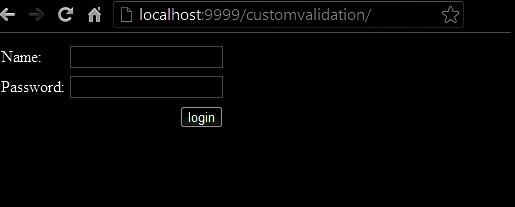
Output: Custom Validation Fields

👁 Custorm Validation Output

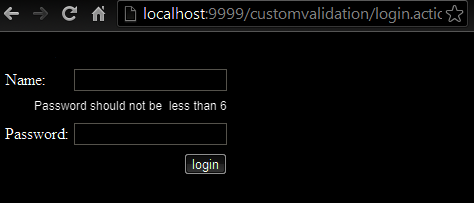
Output: FieldError Validation
👁 FieldError Validation Output

Comment

Explore