|
VOOZH | about |
|
VOOZH | about |
Console class is used to handle input, output and error operations in console applications. It is available in the System namespace and provides methods like Write(), WriteLine() and ReadLine() for interacting with users through the console window. Console applications allow users to enter input using the keyboard and view text-based output on the screen.
The console has two main components:
Hello, From GeeksforGeeks!
To run a C# console program using Command Prompt:
1. Save the file with .cs extension, for example Program.cs
2. Open Command Prompt in that folder.
3. Compile the program using:
csc Program.cs
4. Run the generated executable file:
Program.exe
This will display the output in the console window.
Properties | Description |
|---|---|
Gets or sets the background colour of the console. | |
Gets or sets the height of the buffer area. | |
Gets or sets the width of the buffer area. | |
Gets a value indicating whether the CAPS LOCK keyboard toggle is turned on or turned off. | |
Gets or sets the column position of the cursor within the buffer area. | |
Gets or sets the height of the cursor within a character cell. | |
Gets or sets the row position of the cursor within the buffer area. | |
Gets or sets a value indicating whether the cursor is visible. | |
Gets the standard error output stream. | |
Gets or sets the foreground colour of the console. | |
Gets the standard input stream. | |
Gets or sets the encoding the console uses to read input. | |
Gets a value that indicates whether the error output stream has been redirected from the standard error stream. | |
Gets a value that indicates whether input has been redirected from the standard input stream. | |
Gets a value that indicates whether output has been redirected from the standard output stream. | |
Gets a value indicating whether a key press is available in the input stream. | |
Gets the largest possible number of console window rows, based on the current font and screen resolution. | |
Gets the largest possible number of console window columns, based on the current font and screen resolution. | |
Gets a value indicating whether the NUM LOCK keyboard toggle is turned on or turned off. | |
Gets the standard output stream. | |
Gets or sets the encoding the console uses to write output. | |
Gets or sets the title to display in the console title bar. | |
Gets or sets a value indicating whether the combination of the Control modifier key and C console key (Ctrl+C) is treated as ordinary input or as an interruption that is handled by the operating system. | |
Gets or sets the height of the console window area. | |
Gets or sets the leftmost position of the console window area relative to the screen buffer. | |
Gets or sets the top position of the console window area relative to the screen buffer. | |
Gets or sets the width of the console window. |
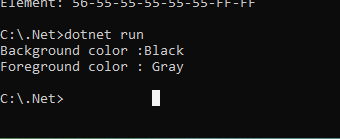
Example: Getting Console Colors
Output
Method | Description |
|---|---|
Plays the sound of a beep through the console speaker. | |
Clears the console buffer and corresponding console window of display information. | |
Copies a specified source area of the screen buffer to a specified destination area. | |
OpenStandardError() | Acquires the standard error stream. |
Acquires the standard input stream. | |
OpenStandardOutput() | Acquires the standard output stream. |
Reads the next character from the standard input stream. | |
Obtains the next character or function key pressed by the user. The pressed key is displayed in the console window. | |
Reads the next line of characters from the standard input stream. | |
Sets the foreground and background console colours to their defaults. | |
Sets the height and width of the screen buffer area to the specified values. | |
Sets the position of the cursor. | |
Sets the Error property to the specified TextWriter object. | |
Sets the In property to the specified TextReader object. | |
| Sets the Out property to the specified TextWriter object. | |
Sets the position of the console window relative to the screen buffer. | |
Sets the height and width of the console window to the specified values. | |
Write() | Writes the text representation of the specified value or values to the standard output stream. |
WriteLine() | Writes the specified data, followed by the current line terminator, to the standard output stream. |
Example: Using WriteLine() Method
Welcome to GeeksforGeeks
This is a tutorial on the Console Class.
Console class provides events used to execute certain programs when some event is triggered such as cancelling an operation or modifying console settings dynamically.
Example: CancelKeyPress Event Occurs when the Control modifier key (Ctrl) and either the C console key (C) or the Break key are pressed simultaneously (Ctrl+C or Ctrl+Break).
Output