|
VOOZH | about |
|
VOOZH | about |
In a database management system (DBMS), a data dictionary can be defined as a component that stores a collection of names, definitions, and attributes for data elements used in the database. The database stores metadata, that is, information about the database. These data elements are then used as part of a database, research project, or information system.
It stores all information about relationships or tables, from the schema and constraints used. All metadata is preserved. In general, metadata refers to information about data. Thus, storing the connection scheme and other metadata in a single structure called a data dictionary or system directory. A data dictionary is like an A-Z dictionary of a relational database system that stores all the information about every relationship in the database.
The data dictionary consists of two words, data, which represents data collected from several sources, and dictionary, which represents where this data is available. The data dictionary is an important part of the relational database because it provides additional information about the relationship between several tables in the database. A data dictionary in a DBMS helps users manage data in an orderly and orderly manner, thereby preventing data redundancy.
Below is a data dictionary that describes the table that contains employee details.
Field Name | Data Type | Field Size for Display | Description | Example |
EmployeeID | Integer |
8 | Unique ID of each employee |
100025 |
FullName | Text |
30 | Full name of the employee | Emily Johnson |
DOB | Date/Time |
10 | Date of birth of employee |
1990-05-15 |
PhoneNumber | Integer |
10 | Phone number of employee |
555-123-4567 |
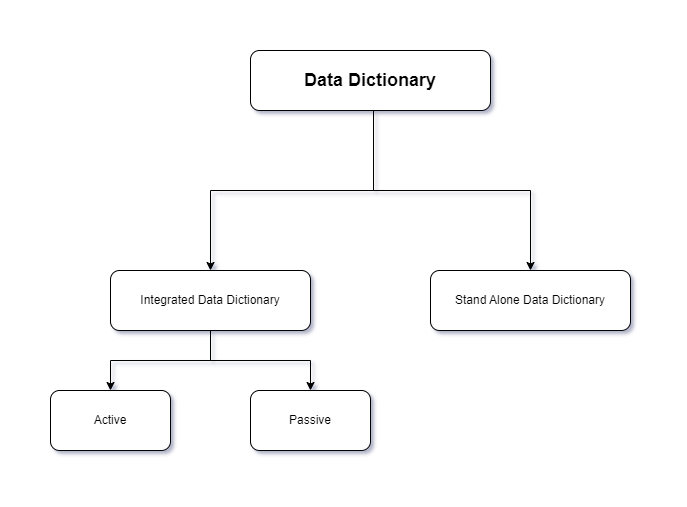
There are basically two types of data dictionaries in a database management system:
Every relational database has an Integrated Data Dictionary available in the DBMS. This integrated data dictionary acts as a system directory that is accessed and updated by the relational database. The old database does not have an integrated data dictionary, so the database administrator must use the Stand Alone Data Dictionary. An Integrated Data Dictionary in a DBMS can link metadata.
The integrated data dictionary can be further divided into two types:
Active: When any changes are made to the database, the active data dictionary is automatically updated by the DBMS. It is also known as a self-updating dictionary because it continuously updates its data.
Passive: Unlike active dictionaries, passive dictionaries must be updated manually when there are changes in the database. This type of data dictionary is difficult to manage because it requires proper functionality. Else, the database and data dictionary will be synchronized.
This type of database in the DBMS is very adaptive because it grants the administrator in charge of the confidential information complete autonomy to define and manage all crucial data. Whether the information is printed or not has nothing to do with it. A data dictionary that has a stand-alone format enables database designers to have the flexibility to communicate with end users regardless of their data dictionaries format.
There is no standard format for data dictionaries. Here are some common elements:
Metadata in a DBMS, stored in a data dictionary, is like a monitor that controls database usage and whether users are allowed to access the database.
As mentioned above, most businesses rely on a database management system that has an integrated data dictionary because it is automatically updated and easy to maintain. Documentation for databases including MySQL, SQL Server, Oracle, etc. This can be done in various relational databases such as
Database administrators can use templates in SQL Server, Oracle, or Microsoft Excel to create a stand-alone data dictionary.
The various notations used to create a data dictionary are:
Data Construct | Notation | Stands For |
Composition |
= | is composed of |
Sequence |
+ | AND |
Selection |
[ | ] | OR |
Repetition | { }^n | n repetitions |
Parentheses |
( ) | to represent optional data |
Comment |
*…* | to define a comment |
1. Employee Table:
Column Name | Data Type | Description |
EmployeeID | INT | Unique identifier for each employee |
FirstName | VARCHAR | First name of the employee |
LastName | VARCHAR | Last name of the employee |
DepartmentID | INT | Foreign key referencing the `Department` table |
Salary | DECIMAL | Numeric value representing the employee's salary |
JoinDate | DATE | Date when the employee joined the company |
Constraints:
- Primary Key: `EmployeeID`
- Foreign Key: `DepartmentID` references `Department.DepartmentID`
2. Product Inventory Table:
Column Name | Data Type | Description |
ProductID | INT | Unique identifier for each product |
ProductName | VARCHAR | Name of the product |
CategoryID | INT | Foreign key referencing the `ProductCategory` table |
QuantityInStock | INT | Numeric value representing the available quantity |
UnitPrice | DECIMAL | Price per unit of the product |
Constraints:
- Primary Key: `ProductID`
- Foreign Key: `CategoryID` references `ProductCategory.CategoryID`