|
VOOZH | about |
|
VOOZH | about |
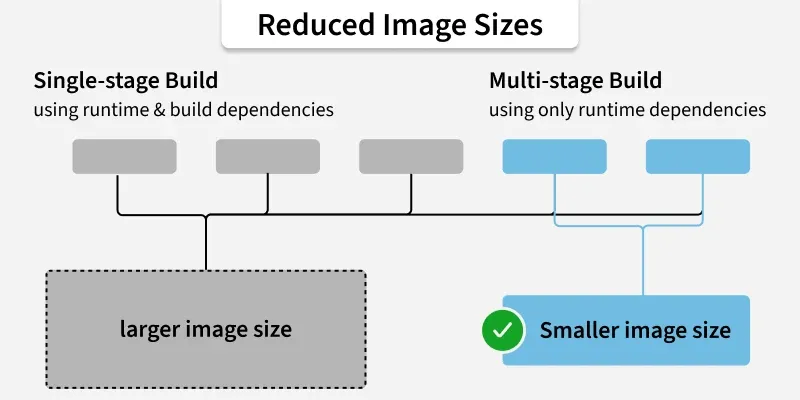
A multistage Dockerfile is a feature introduced in Docker to address the challenge of creating lean and efficient container images Traditionally, Docker images used to contain all the dependencies, libraries, and tools required to run an application, leading to bloated images that consume unnecessary disk space and hence increase the deployment times
Now Multistage builds allow developers to build multiple intermediate images within a single Dockerfile, and each intermediate image serves a specific purpose in the build process.
In a multistage Dockerfile, developers define multiple build stages, each encapsulating a specific set of instructions and dependencies. These stages can be named and referenced within the Dockerfile, enabling seamless communication between them.
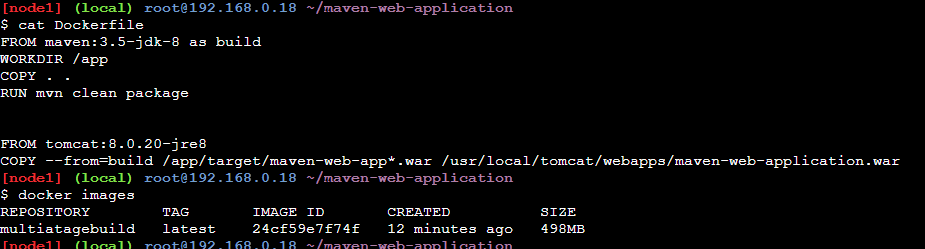
# Code template to get you started For Multistage Dockerfile
# Build stage with development tools
FROM maven:3.5-jdk-8 as build
WORKDIR /app
COPY . .
RUN mvn clean package

#FInal Stage
FROM tomcat:8.0.20-jre8
COPY --from=build /app/target/maven-web-app*.war /usr/local/tomcat/webapps/maven-web-application.warFROM maven:3.5-jdk-8 as build: This line designates the official Maven image with JDK 8 installed as the basis image for the build stage.WORKDIR /app: Sets the Docker container's working directory to /app.COPY . .: Moves each file from the current directory (which includes the Dockerfile) to the /app directory of the container.RUN mvn clean package: Performs out the project's cleanup and WAR file packaging using the Maven command. The Maven project is assumed to be in the root directory with this command.FROM tomcat:8.0.20-jre8: Use the official Tomcat image with JRE 8 installed as the basis image for the final step.COPY --from=build /app/target/maven-web-app*.war /usr/local/tomcat/webapps/maven-web-application.war: Copies the generated WAR file from the build step into the final image's Tomcat webapps directory (/usr/local/tomcat/webapps/). The file is being copied from the previous build stage, according to by the --from=build flag. To take into account version numbers or other variations in the WAR file name, use the wildcard pattern maven-web-app*.war.The AS keyword in the FROM instruction lets us to assign names to the construction phases. In spite of keeping everything clear, this naming makes sure that directives like COPY remain intact if the Dockerfile is later reorganized. Kindly refer to the command below for your reference.
FROM maven:3.5-jdk-8 as buildWhen getting the Docker image, we may provide the target build stage with the --target flag to stop at that particular point. This allows you to halt the build process as certain points without building the stages that followed.
docker build --target build -t your-image-name .The parameter --target build defines the 'build' target build stage. This tells Docker to terminate the build process once the commands provided in the 'build' stage have been performed out.-t your-image-name assigns a tag (name) to the Docker image.. indicates the current directory where the Dockerfile is located. Distroless images are lightweight container images provided by Google that include only the application runtime dependencieswithout a package manager, shell, or OS utilities. This makes them significantly smaller and more secure than traditional base images like Ubuntu or Debian.
In the context of multi-stage Dockerfiles:
maven:3.5-jdk-8, golang:1.x) and then copy only the compiled binaries or artifacts into a distroless runtime image.The FROM instruction is employed to reference an image from a Docker registry or repository when employing an external image as a stage in a Dockerfile. You can reuse pre-built images as stages in your multi-stage builds through this approach.
# Build stage with development tools
FROM maven:3.5-jdk-8 as build
WORKDIR /app
COPY . .
RUN mvn clean package
#FInal Stage
FROM tomcat:8.0.20-jre8
COPY --from=build /app/target/maven-web-app*.war /usr/local/tomcat/webapps/maven-web-application.war
COPY --from=build /app/target/maven-web-app*.war /usr/local/tomcat/webapps/maven-web-application.war: Copies the WAR file generated during the build stage from the build stage's /app/target/ directory to the stage's /usr/local/tomcat/webapps/ directory. Through doing this, the Maven-based web application has been properly configured on the Tomcat server.An application ingesting and analyzing data streams like tweets or stock prices in real-time To handle this efficiently, we require leverage multi-stage builds: