The digital design process is essential for creating effective and engaging digital products. It involves stages like conceptualization, research, prototyping, user testing, and implementation. Each phase ensures that the final product meets user needs, business goals, and industry standards. By mastering this process, designers can produce visually appealing, functional, and user-friendly solutions.
The digital design process is a structured approach to creating digital products like websites, mobile apps, and software. It involves defining goals, understanding user needs, and developing a visual and functional design that is user-friendly and efficient. This process ensures that the final product meets both user expectations and business objectives, resulting in a cohesive and effective digital solution.
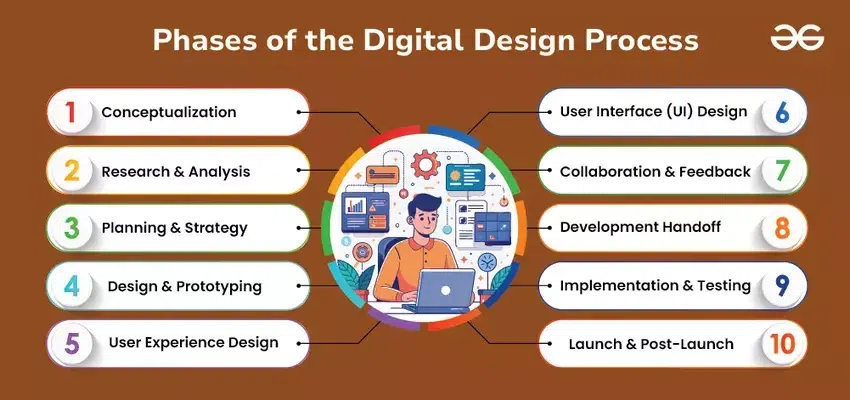
The digital design process is divided into several key phases, each crucial for creating effective and engaging digital products. Here are the main phases:
Phase 1: Conceptualization:
Goal Setting: Define the project's purpose and objectives.
Brainstorming: Generate ideas and features.
Initial Vision: Create a high-level vision of the product.
Phase 2: Research and Analysis:
User Research: Understand target audience needs and behaviors.
Market Research: Analyze market trends and competitor products.
Requirements Gathering: Identify functional and non-functional requirements.
Phase 3: Planning and Strategy:
Project Roadmap: Outline the project's timeline and milestones.
Scope Definition: Determine the project’s boundaries and deliverables.
Resource Allocation: Assign tasks and resources.
Phase 4: Design and Prototyping:
Sketching and Wireframing: Create basic layouts and structure.
Communication: Ensure developers understand the design intentions.
Phase 9: Implementation and Testing:
Development: Code the design into a functional product.
Quality Assurance: Test the product to ensure it meets design and functionality standards.
Bug Fixing: Address any issues or defects found during testing.
Phase 10: Launch and Post-Launch Activities:
Deployment: Release the product to users.
Monitoring: Track user interactions and performance.
Feedback Collection: Gather user feedback to identify areas for improvement.
Continuous Improvement: Iterate on the design based on user feedback and data analysis.
Design and Prototyping
Design and Prototyping are crucial phases in the digital design process that involve translating concepts into tangible and testable representations of a product.
Design
Visual Design: This involves creating detailed visual representations of the product, including layout, color schemes, typography, and imagery. The goal is to make the product aesthetically pleasing and aligned with brand guidelines.
High-Fidelity Mockups: Designers develop detailed and realistic mockups that show how the final product will look. These mockups include all design elements and interactions.
Design Systems and Style Guides: Establishing consistent design standards and guidelines to ensure uniformity across different parts of the product and future projects.
Prototyping
Wireframes: Early sketches or diagrams that outline the basic structure and functionality of the product without detailed design elements. Wireframes help visualize layout and user interactions.
Interactive Prototypes: Clickable models that simulate user interaction with the product. These prototypes allow stakeholders and users to experience the product’s functionality and flow before development begins.
Usability Testing: Conducting tests with real users to evaluate how well the prototype meets their needs, identify usability issues, and gather feedback for improvements.
Together, design and prototyping ensure that the product is both visually appealing and functional, providing a clear blueprint for development and helping to validate ideas early in the process.
User Experience (UX) Design
User Experience (UX) Design is a critical aspect of the digital design process focused on creating products that offer meaningful and relevant experiences to users. It involves understanding users' needs, behaviors, and motivations to design products that are intuitive, efficient, and enjoyable to use. Here’s a closer look at key components of UX design:
Understanding User Needs
User Research: Conducting interviews, surveys, and observations to gather insights about users' needs, preferences, and pain points.
Personas: Creating detailed profiles representing different user types to guide design decisions and ensure the product meets diverse user needs.
Information Architecture
Site Maps: Structuring the organization of content and navigation within the product to ensure users can easily find information.
Content Hierarchy: Arranging content in a logical order, from the most important to the least, to facilitate intuitive navigation and comprehension.
User Flows and Journeys
User Flows: Mapping out the steps users take to complete specific tasks within the product, such as signing up or making a purchase.
User Journeys: Illustrating the overall experience users have with the product, including interactions, emotions, and touchpoints across different stages.
Usability Testing
Prototyping: Creating low- or high-fidelity prototypes to test the design with real users.
Testing and Feedback: Observing how users interact with the prototype, identifying usability issues, and gathering feedback to refine and improve the design.
Interaction Design
Wireframes: Developing basic layouts and structures to outline how users will interact with different elements of the product.
Interactive Elements: Designing buttons, forms, and other interactive components to be intuitive and user-friendly.
Accessibility and Inclusivity
Accessibility Standards: Ensuring the product is usable by people with disabilities, following guidelines such as the Web Content Accessibility Guidelines (WCAG).
Inclusive Design: Considering diverse user needs and backgrounds to create a product that is accessible and usable for everyone.
User Interface (UI) Design
User Interface (UI) Design focuses on creating the visual and interactive aspects of a digital product to ensure it is both aesthetically pleasing and functional. The goal of UI design is to enhance user interaction through effective layout, visual hierarchy, and intuitive controls. Here’s a breakdown of the key components of UI design:
1. Visual Design
Layout and Composition: Arranging elements on the screen to create a coherent and visually appealing structure. This includes spacing, alignment, and grouping of content.
Color Schemes: Choosing colors that reflect the brand’s identity and create a pleasant visual experience. Color is used to guide users' attention, convey meaning, and ensure accessibility.
Typography: Selecting fonts and text sizes that enhance readability and contribute to the overall design aesthetic. Consistent typography helps in creating a clear visual hierarchy.
2. Interactive Elements
Buttons and Controls: Designing buttons, sliders, checkboxes, and other interactive components to be easily recognizable and functional. The goal is to make interactions straightforward and intuitive.
Forms and Inputs: Creating input fields, dropdowns, and other form elements to collect user data efficiently. Proper labeling and validation are crucial for user input accuracy.
3. Responsive Design
Adaptive Layouts: Designing interfaces that work seamlessly across different devices and screen sizes, such as desktops, tablets, and smartphones. This involves creating flexible layouts and scalable elements.
Media Queries: Using CSS techniques to adjust the design based on the device's characteristics, such as screen width and orientation.
4. Style Guides and Design Systems
Design Systems: Developing a collection of reusable components and design patterns to ensure consistency across the product. This includes guidelines for colors, typography, spacing, and interactive elements.
Style Guides: Documenting design standards and best practices to maintain uniformity throughout the project and assist in onboarding new team members.
5. Visual Hierarchy
Hierarchy and Emphasis: Using visual cues like size, color, and contrast to highlight important elements and guide users through the interface. Effective visual hierarchy helps users navigate the product intuitively.
Feedback and Affordances: Providing visual feedback for user actions, such as button states and error messages, to enhance the interaction experience and inform users about system status.
Implementation steps of Digital Design Process
The implementation steps of the digital design process involve translating design concepts into a functional product. These steps ensure that the final product meets design specifications, user needs, and business goals. Here’s a breakdown of the key implementation steps:
Finalize Design Specifications:
Detail Design Documentation: Ensure that all design elements, interactions, and specifications are documented clearly.
Design Handoff: Prepare and deliver design assets, including mockups, style guides, and prototypes, to the development team.
Development Preparation:
Technology Stack Selection: Choose the appropriate technologies and tools for development, based on project requirements.
Development Environment Setup: Configure development environments, including servers, databases, and development tools.
Front-End Development:
HTML/CSS Coding: Convert design mockups into HTML and CSS to create the structure and style of the user interface.
JavaScript Implementation: Add interactivity and dynamic functionality to the product using JavaScript and related frameworks.
Back-End Development:
Server-Side Logic: Develop server-side code to handle data processing, user authentication, and application logic.
Database Integration: Implement and connect to databases to manage and store data.
Integration:
API Integration: Connect the front-end and back-end systems using APIs to enable communication between different parts of the application.
Third-Party Services: Integrate external services, such as payment gateways or analytics tools, as required.
Quality Assurance (QA):
Testing: Conduct various types of testing, including functional, usability, and performance testing, to ensure the product meets quality standards.
Bug Fixing: Identify and resolve any issues or defects found during testing.
User Acceptance Testing (UAT):
Stakeholder Review: Allow stakeholders and end-users to test the product in a real-world scenario to validate its functionality and usability.
Feedback Implementation: Incorporate feedback from UAT to make final adjustments and improvements.
Deployment:
Staging Environment: Deploy the product to a staging environment for final verification.
Production Deployment: Launch the product to the live environment, making it available to end-users.
Post-Launch Activities:
Monitoring: Continuously monitor the product for performance, user interactions, and potential issues.
Maintenance and Support: Provide ongoing support and maintenance to address any post-launch issues or updates.
Iteration and Improvement:
User Feedback: Gather feedback from users and stakeholders to identify areas for improvement.
Updates and Enhancements: Make iterative updates to enhance functionality, address user needs, and improve overall performance.
Real-world examples of Digital Design Process
Amazon updates its website layout to improve user experience. This involves conceptualizing design goals, researching user needs, designing new interfaces, creating prototypes, implementing changes, and testing before launching the updated site.
Spotify adds a new feature to its app. The process includes defining feature requirements, researching user preferences, designing the feature, developing and integrating it into the app, testing for bugs, and rolling it out to users.
Teladoc Health develops a telemedicine app. They conceptualize the app's features, research healthcare regulations, design user-friendly interfaces, prototype the app, implement it, test for usability and security, and then deploy it to users.
Instagram introduces new story editing tools. They start by identifying user needs, researching competitive features, designing the new tools, prototyping, implementing them into the app, testing with users, and finally deploying the feature.
Benefits of Digital Design Process
The Digital Design Process offers numerous benefits across various stages of product development. Here are some key benefits:
Improved User Experience: By focusing on user needs and feedback throughout the design process, products are more intuitive and user-friendly.
Enhanced Product Quality: Systematic design and prototyping help identify and address issues early, leading to higher quality and reliability of the final product.
Efficient Development Process: Clear design specifications and prototyping streamline the development process, reducing misunderstandings and rework.
Better Risk Management: Identifying potential issues during the design phase minimizes risks associated with functionality and usability problems.
Increased Innovation: The iterative nature of the design process encourages experimentation and exploration of new ideas, fostering innovation.
Cost Savings: Early identification of design flaws and iterative development can lead to significant cost savings by preventing expensive fixes post-launch.