|
VOOZH | about |
|
VOOZH | about |
State management is a crucial aspect of building dynamic and responsive applications. While building applications, we sometimes need to maintain a state between multiple screens. Here comes the part of State Management. There are different state management techniques in Flutter like GetX, Provider, BloC and Redux.
Redux is a state management library initially created for JavaScript applications. It was developed by Dan Abramov and Andrew Clark in 2015, inspired by the Flux architecture by Facebook. Redux is a predictable state management library commonly used in Flutter. It helps programmers implement a centralized store that can be accessed throughout the entire application. It has some principles which are given below.
Redux works in a unidirectional way. It distributes data across multiple widgets in a repetitive manner.
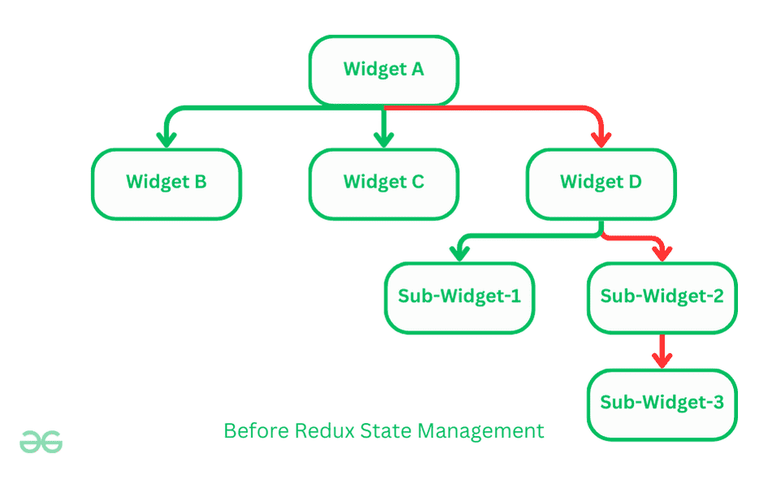
In the above example, the generated data in Widget-A is needed in Sub-Widget-3. Traditionally, data is passed through the Widget-D to Sub-Widget-2 and then finally to Sub-Widget-3. In this case, the data may be saved in the upper widget tree, and whenever required, it gets sent down the widget tree.
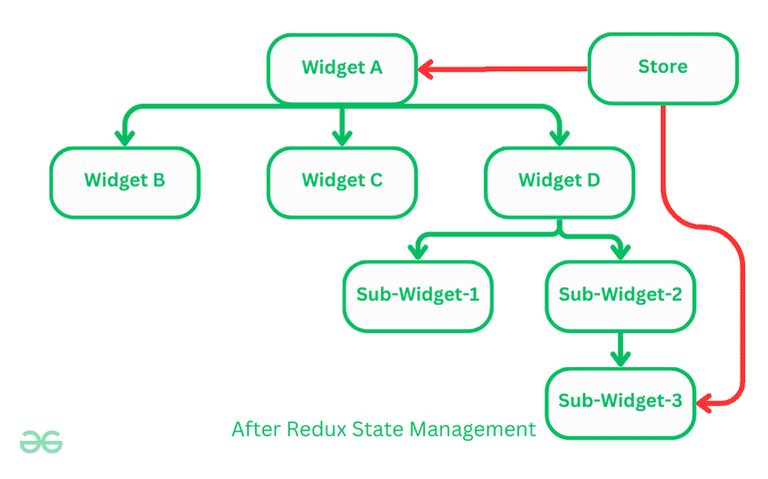
With the help of Redux we can overcome this problem. Instead of passing the data down the widget tree, we can maintain data in a centralized-store. This store maintains the state of the application. The data in this centralized store can be accessed by any widget without needing to pass thought chain of other widgets in widget tree.
In this article we are practically implementing the redux. For this we are making a basic app which will display a random number or alphabet when a button is pressed. while building the app we are not focusing on the UI but we are emphasizing on the implementing functionality with Redux. Let's see a demo video of what we are going to develop.
Demo Video:
Create a new Flutter application using the command Prompt. To create a new app, write the following command and run it.
flutter create app_nameTo know more about it refer this article: Creating a Simple Application in Flutter
To add the dependency to the pubspec.yaml file, add redux and flutter_redux as a dependency in the dependencies part of the pubspec.yaml file, as shown below:
Now, run the command below in the terminal.
flutter pub getOr
Run the below command in the terminal.
flutter pub add redux flutter_reduxThe state of an application is the state representation of the app at a point in time. The store is the object that brings together the state, actions, and reducers. In this example, we create a store that generates random values.
final store = Store(generateRandomValues, initialState: 'Initial Value');Store is a class that is used to create a new Redux store. As we discussed earlier, Store holds the state of our app. In this snippet, generateRandomValues is the reducer function, which is a pure function that takes the previous state and an action, and returns the next state. initialState indicated the initial state of the store to string 'Initial Value'.
Actions are fundamental form of information. They are stored as plain dart objects and describes an event or change that need to be made in application state. Actions are dispatched in response to user interactions with the application, such as button clicks or form submission.
enum RandomTypes { Numbers, Alphabets }In the above code snippet. We have defined two types of actions here, Numbers and Alphabets. These actions can be dispatched to the store.
When an actions is dispatched, The redux store invokes the reducer function with current state and dispatches the action. The reducer function, based on the action type, performs the necessary state transition and returns the new state.
Reducers are pure functions. They specify how the application's state changes in response to actions sent to the store.
In this example, we have declared a reducer that generates random values based on the action type. This function generates a random number or a random uppercase alphabet letter, respectively, and returns a new state.
Now the crucial step comes in, To connect redux to the flutter app we can use StoreProvider widget. This widget takes a Store and a child, and it will provide the Store to all descendant of the child.
main.dart:
Redux provides a robust solution for managing state in Flutter applications. In this article we have seen some basic principles of redux along with how to implement them. We have built a simple flutter app using redux state management, which will generate random number and character.