|
VOOZH | about |
|
VOOZH | about |
Alzheimer's disease is a neurodegenerative disorder characterized by progressive cognitive decline and memory loss. Detecting Alzheimer's disease early is crucial for timely intervention and treatment. While I can provide some general information on Alzheimer's detection, it's important to consult medical professionals for accurate diagnosis and advice.
Machine learning has shown promise in aiding the detection of Alzheimer's disease. In this article, we will apply RandomForestClassifier and LocalOutlierFactor to detect Alzheimer's disease.
COL | FULL-FORMS |
|---|---|
Group | Nondemented or Demented |
EDUC | Years of education |
SES | Socioeconomic Status |
MMSE | Mini-Mental State Examination |
CDR | Clinical Dementia Rating |
eTIV | Estimated Total Intracranial Volume |
nWBV | Normalize Whole Brain Volume |
ASF | Atlas Scaling Factor |
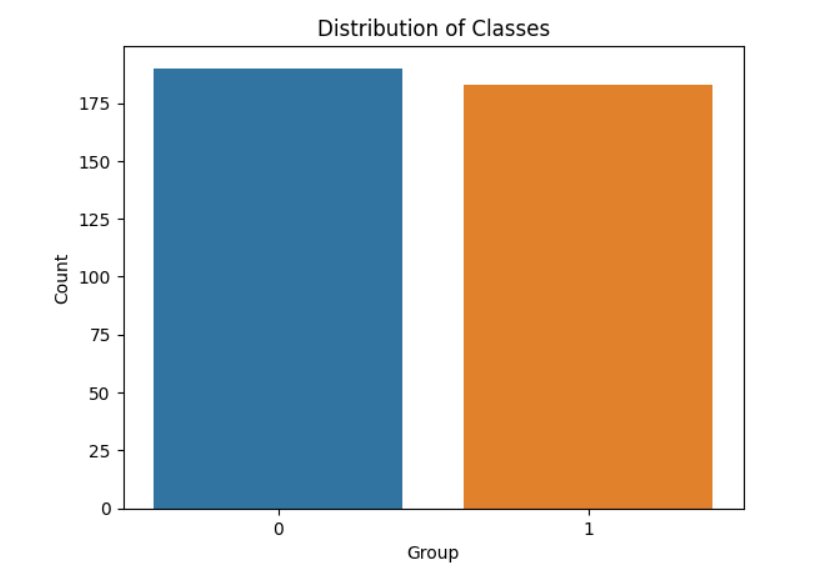
The dataset contains 373 rows with 14 fields which contain Group fields with classes Demented and Non-Demented where we need to work on them.
We have imported the required packages.
Output:
 Subject ID MRI ID Group Visit MR Delay M/F Hand Age EDUC \
0 OAS2_0001 OAS2_0001_MR1 Nondemented 1 0 M R 87 14
1 OAS2_0001 OAS2_0001_MR2 Nondemented 2 457 M R 88 14
2 OAS2_0002 OAS2_0002_MR1 Demented 1 0 M R 75 12
3 OAS2_0002 OAS2_0002_MR2 Demented 2 560 M R 76 12
4 OAS2_0002 OAS2_0002_MR3 Demented 3 1895 M R 80 12
 SES MMSE CDR eTIV nWBV ASF
0 2.0 27.0 0.0 1987 0.696 0.883
1 2.0 30.0 0.0 2004 0.681 0.876
2 NaN 23.0 0.5 1678 0.736 1.046
3 NaN 28.0 0.5 1738 0.713 1.010
4 NaN 22.0 0.5 1698 0.701 1.034
Output:
<class 'pandas.core.frame.DataFrame'>
RangeIndex: 373 entries, 0 to 372
Data columns (total 15 columns):
 # Column Non-Null Count Dtype
--- ------ -------------- -----
 0 Subject ID 373 non-null object
 1 MRI ID 373 non-null object
 2 Group 373 non-null object
 3 Visit 373 non-null int64
 4 MR Delay 373 non-null int64
 5 M/F 373 non-null object
 6 Hand 373 non-null object
 7 Age 373 non-null int64
 8 EDUC 373 non-null int64
 9 SES 354 non-null float64
 10 MMSE 371 non-null float64
 11 CDR 373 non-null float64
 12 eTIV 373 non-null int64
 13 nWBV 373 non-null float64
 14 ASF 373 non-null float64
dtypes: float64(5), int64(5), object(5)
memory usage: 43.8+ KB
Output:
(373, 10)
Output:
Group
Nondemented 190
Demented 146
Converted 37
Name: count, dtype: int64
Output:
Group 0
M/F 0
Age 0
EDUC 0
SES 19
MMSE 2
CDR 0
eTIV 0
nWBV 0
ASF 0
dtype: int64
As we can see that only the SES column has null values. Because SES denotes ranks of Socioeconomic Status, It is a categorical feature. So, We can replace the null values of SES with its mode.
Fill the MMSE null values with its Median
Y represents the target variable - labels as a Numpy array and X represents the list of selected columns as a matrix which is used for the classification task.
outlier_detector = LocalOutlierFactor(contamination=0.05): Creating an instance of the Local Outlier Factor (LOF) algorithm for outlier detection. The contamination parameter is set to 0.05, which means we are expecting 5% outliers.
outliers = outlier_detector.fit_predict(X): This step calculates the outlier scores for each sample. This also gives and assigns a label of -1 for outliers and 1 for inliers.
The next two steps represent that we are selecting only inliers for further processing. This step of code creates transformers for categorical numerical and numerical features and helps in training the model consistently.
Output:
By default, 75% for training and 25% for testing.
Building a pipeline for usage with Random Forest classifier and Preprocessor, then fit the model.
Output:
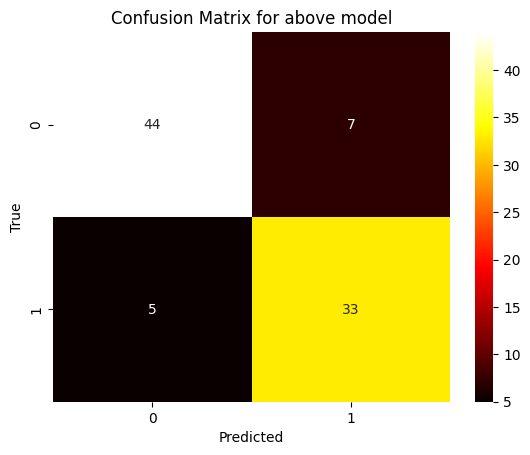
Accuracy: 0.8651685393258427
Precision: 0.825
Recall: 0.868421052631579
F1 Score: 0.8461538461538461
Output: