Classifying data using Support Vector Machines(SVMs) in Python
Last Updated : 2 Aug, 2025
Support Vector Machines (SVMs) are supervised learning algorithms widely used for classification and regression tasks. They can handle both linear and non-linear datasets by identifying the optimal decision boundary (hyperplane) that separates classes with the maximum margin. This improves generalization and reduces misclassification.
Core Concepts
Hyperplane : The decision boundary separating classes. It is a line in 2D, a plane in 3D or a hyperplane in higher dimensions.
Support Vectors : The data points closest to the hyperplane. These points directly influence its position and orientation.
Margin : The distance between the hyperplane and the nearest support vectors from each class. SVMs aim to maximize this margin for better robustness and generalization.
Regularization Parameter (C) : Controls the trade-off between maximizing the margin and minimizing classification errors. A high value of C prioritizes correct classification but may overfit. A low value of C prioritizes a larger margin but may underfit.
Optimization Objective
SVMs solve a constrained optimization problem with two main goals:
Maximize the margin between classes for better generalization.
Minimize classification errors on the training data, controlled by the parameter C.
The Kernel Trick
Real-world data is rarely linearly separable. The kernel trick elegantly solves this by implicitly mapping data into higher-dimensional spaces where linear separation becomes possible, without explicitly computing the transformation.
Common Kernel Functions
Linear Kernel: Ideal for linearly separable data, offers the fastest computation and serves as a reliable baseline.
Polynomial Kernel: Models polynomial relationships with complexity controlled by degree d, allowing curved decision boundaries.
Radial Basis Function (RBF) Kernel: Maps data to infinite-dimensional space, widely used for non-linear problems with parameter controlling influence of each sample.
Sigmoid Kernel: Resembles neural network activation functions but is less common in practice due to limited effectiveness.
Implementing SVM Classification in Python
1. Importing Required Libraries
We will import required python libraries
NumPy: Used for numerical operations.
Matplotlib: Used for plotting graphs (can be used later for decision boundaries).
load_breast_cancer: Loads the Breast Cancer Wisconsin dataset from scikit-learn.
StandardScaler: Standardizes features by removing the mean and scaling to unit variance.
SVC: Support Vector Classifier from scikit-learn.
2. Loading the Dataset
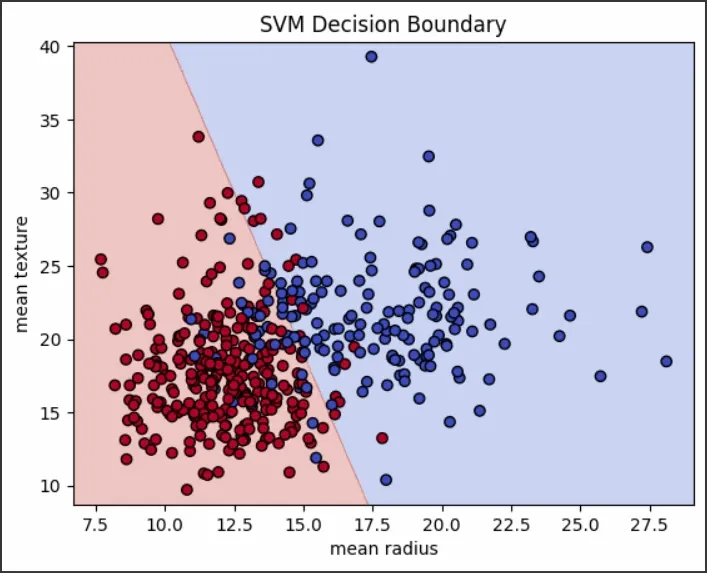
We will load the dataset and select only two features for visualization:
load_breast_cancer(): Returns a dataset with 569 samples and 30 features.
data.data[:, [0, 1]]: Selects only two features (mean radius and mean texture) for simplicity and visualization.
data.target: Contains the binary target labels (malignant or benign).
3. Splitting the Data
We will split the dataset into training and test sets:
train_test_split: splits data into training (80%) and test (20%) sets
random_state=42: ensures reproducibility
4. Scale the Features
We will scale the features so that they are standardized:
StandardScaler – standardizes data by removing mean and scaling to unit variance
fit_transform() – fits the scaler to training data and transforms it
transform() – applies the same scaling to test data
5. Train the SVM Classifier
We will train the Support Vector Classifier:
SVC: creates an SVM classifier with a specified kernel
kernel='linear': uses a linear kernel for classification
C=1.0: regularization parameter to control margin vs misclassification
fit(): trains the classifier on scaled training data
6. Evaluate the Model
We will predict labels and evaluate model performance:
predict(): makes predictions on test data
accuracy_score(): calculates prediction accuracy
classification_report(): shows precision, recall and F1-score for each class
SVMs work best when the data has clear margins of separation, when the feature space is high-dimensional (such as text or image classification) and when datasets are moderate in size so that quadratic optimization remains feasible.
Advantages
Performs well in high-dimensional spaces.
Relies only on support vectors, which speeds up predictions.
Can be used for both binary and multi-class classification.
Limitations
Computationally expensive for large datasets with time complexity O(n²)–O(n³).
Requires feature scaling and careful hyperparameter tuning.
Sensitive to outliers and class imbalance, which may skew the decision boundary.
Support Vector Machines are a robust choice for classification, especially when classes are well-separated. By maximizing the margin around the decision boundary, they deliver strong generalization performance across diverse datasets.
Performance Optimization Tips
For Large Datasets
Use LinearSVC for linear kernels (faster than SVC with linear kernel)
Consider SGDClassifier with hinge loss as an alternative
Memory Management
Use probability = False if you don't need probability estimates
Consider incremental learning for very large datasets
Use sparse data formats when applicable
Preprocessing Best Practices
Always scale features before training
Remove or handle outliers appropriately
Consider feature engineering for better separability
Use dimensionality reduction for high-dimensional sparse data