|
VOOZH | about |
|
VOOZH | about |
The RWeka package in R provides a convenient interface to the powerful machine-learning algorithms offered by the Weka library. Weka is a widely used suite of machine learning software that contains a collection of tools for data preprocessing, classification, regression, clustering, and visualization.
To use RWeka, you first need to install the package and load it into your R session.
install.packages("RWeka")RWeka supports a wide range of machine-learning algorithms. You can use functions like Weka_control() to create parameters for your model, and functions like J48() for decision trees and NaiveBayes() for Naive Bayes classifiers.
J48(), NaiveBayes()REPTree(), M5()KMeans()Now we will discuss tep by step How to Use RWeka Package on a Dataset using R Programming Language:
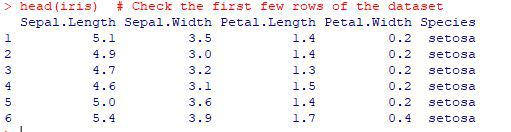
You can either load a built-in R dataset or import your own dataset (CSV, Excel, etc.). For demonstration purposes, we'll use the iris dataset, which is commonly used for classification tasks.
Output:
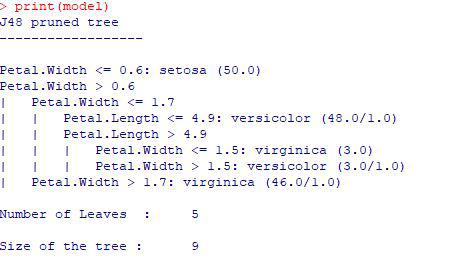
RWeka provides various algorithms. Let's use J48 (Weka's version of the C4.5 algorithm for decision trees) .
The J48() function will train a decision tree model on the dataset.
Output:
This builds a decision tree to classify the Species (target variable) based on the other features in the iris dataset (Sepal.Length, Sepal.Width, etc.).
Use the predict() function to make predictions on new data. You can either use the same dataset (for simplicity) or use a separate test dataset.
Output:
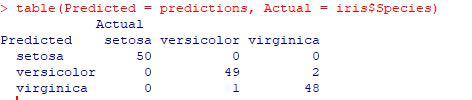
To evaluate the model, compare the predictions to the actual labels using a confusion matrix.
Output:
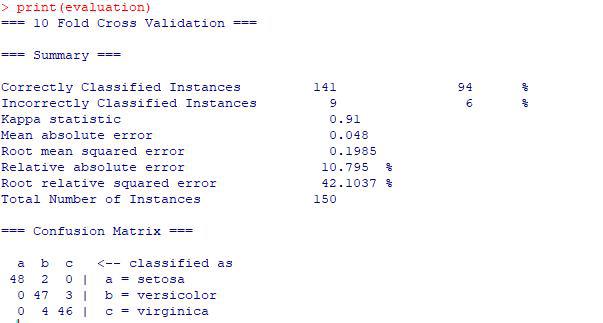
To perform cross-validation (e.g., 10-fold cross-validation) and get more robust performance metrics, use the evaluate_Weka_classifier() function.
Output:
This function outputs detailed statistics about model performance (e.g., accuracy, precision, recall) based on the cross-validation process.
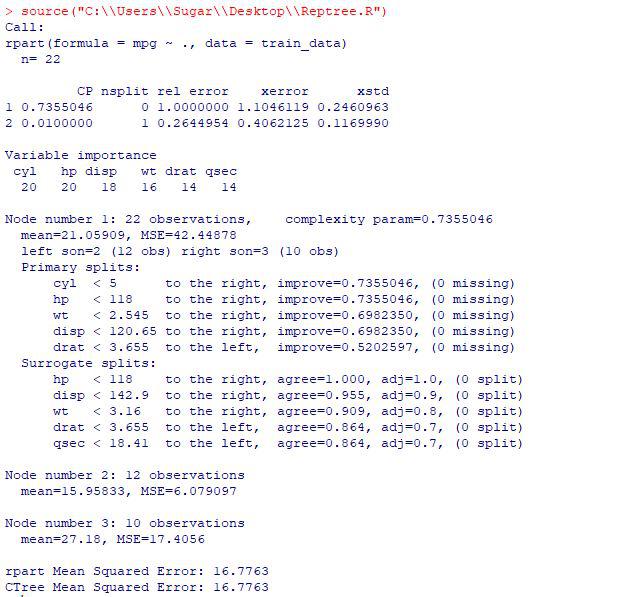
Now we will discuss an example for Regression using REPTree() and M5():
Output:
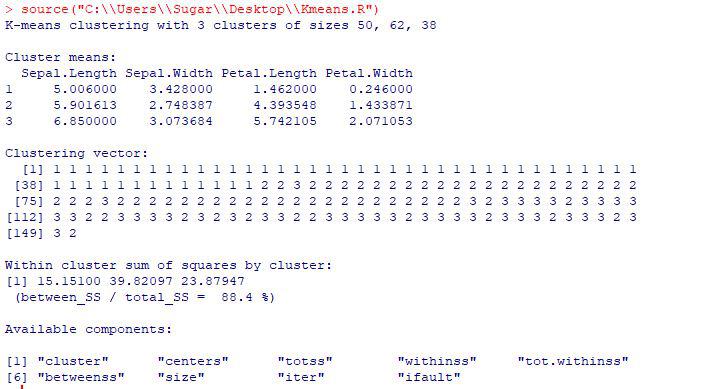
Now we will discuss Example for Clustering using KMeans():
Output:
The RWeka package provides powerful tools for implementing machine learning techniques in R. Following the steps described above, you can easily set up, deploy, and evaluate models on datasets so For further application, consider additional algorithms and tuning parameters to improve the performance of the model.