|
VOOZH | about |
|
VOOZH | about |
In machine learning, it's important to understand how our models make decisions. SHAP values help explain these decisions, making them easier to understand. Here, we'll show you how to use SHAP values with an ElasticNet model, a type of regression model that combines two regularization methods.
ElasticNet is a type of linear regression that combines Lasso (L1) and Ridge (L2) regression. Lasso helps by setting some feature coefficients to zero, effectively selecting features. Ridge shrinks the coefficients of less important features but never to zero. Combining these helps handle datasets with many features or collinearity (highly correlated features).
SHAP (Shapley Additive explanations) values are a way to explain the output of machine learning models. They show how each feature contributes to the prediction. SHAP values ensure that the sum of the contributions of all features equals the prediction, providing a clear and consistent explanation.
Now we will discuss Step-by-step Implementation of How to Use SHAP on ElasticNet Machine Learning Model in R Programming Language.
Fit an ElasticNet model using cross-validation to find the optimal parameters.
This is necessary for iml to calculate SHAP values. The predictor object is configured to work with the ElasticNet model's prediction function.
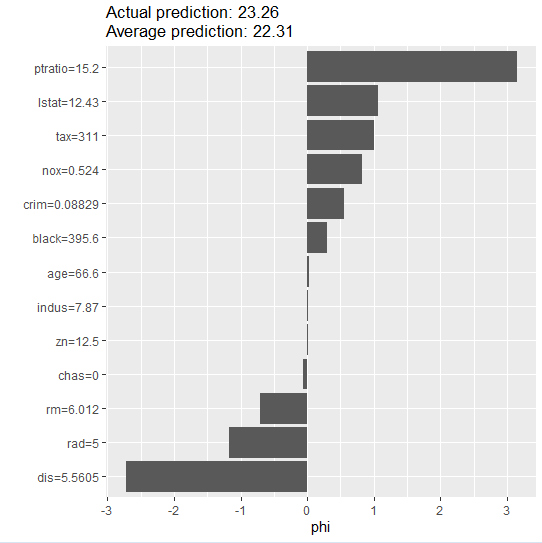
Compute SHAP values for a single observation to understand the contribution of each feature to the model's prediction.
Output:
 feature phi phi.var feature.value
1 crim 0.54899182 1.833532345 crim=0.08829
2 zn 0.01305003 0.734931339 zn=12.5
3 indus 0.01808013 0.001029505 indus=7.87
4 chas -0.05855281 0.111972362 chas=0
5 nox 0.82755557 4.778691816 nox=0.524
6 rm -0.71419578 9.239779286 rm=6.012
7 age 0.02278470 0.005148661 age=66.6
8 dis -2.72742551 9.205870175 dis=5.5605
9 rad -1.16795643 5.982727995 rad=5
10 tax 0.99692882 2.610797043 tax=311
11 ptratio 3.14564086 4.930773768 ptratio=15.2
12 black 0.30031595 0.577063776 black=395.6
13 lstat 1.06359947 23.118524053 lstat=12.43
Plot these SHAP values to visualize feature contributions.
Output:
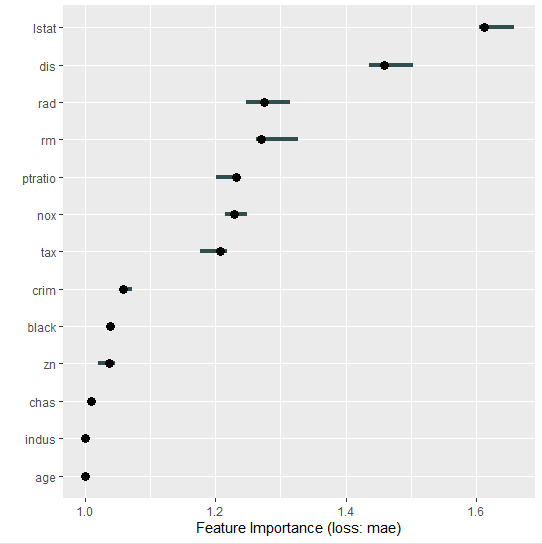
Compute and plot feature importance for the entire test set to understand which features are most significant in the model.
Output:
Using SHAP values to interpret an ElasticNet machine learning model is a powerful way to understand how different features contribute to predictions.This process helps in making our model more transparent and trustworthy, as it reveals the impact of each feature on the model's decisions. With these insights, we can improve our model, communicate findings more effectively, and make informed decisions based on the model's outputs.