|
VOOZH | about |
|
VOOZH | about |
K-means clustering is an unsupervised algorithm that is used in customer segmentation applications. In this algorithm, we try to form clusters within our datasets that are closely related to each other in a high-dimensional space.
Output:
array([[ 0., 0., 5., ..., 0., 0., 0.], [ 0., 0., 0., ..., 10., 0., 0.], [ 0., 0., 0., ..., 16., 9., 0.], ..., [ 0., 0., 1., ..., 6., 0., 0.], [ 0., 0., 2., ..., 12., 0., 0.], [ 0., 0., 10., ..., 12., 1., 0.]])
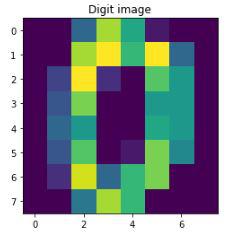
Each handwritten digit in the data is an array of color values of pixels of its image. For better understanding, let's print how the data of the first digit looks like and then display its's respective image
Output:
First handwritten digit data: [ 0. 0. 5. 13. 9. 1. 0. 0. 0. 0. 13. 15. 10. 15. 5. 0. 0. 3.
15. 2. 0. 11. 8. 0. 0. 4. 12. 0. 0. 8. 8. 0. 0. 5. 8. 0.
0. 9. 8. 0. 0. 4. 11. 0. 1. 12. 7. 0. 0. 2. 14. 5. 10. 12.
0. 0. 0. 0. 6. 13. 10. 0. 0. 0.]
We scale the data to improve performance, converting pixel values (0–255) to a smaller range (e.g., 0–1 or −1 to 1). Since this is unsupervised learning, a train-test split is not mandatory. We set k = 10 based on prior knowledge that the dataset contains digits from 0–9 (clusters are not predefined).
Output:
[[ 0. -0.33501649 -0.04308102 ... -1.14664746 -0.5056698
-0.19600752]
[ 0. -0.33501649 -1.09493684 ... 0.54856067 -0.5056698
-0.19600752]
[ 0. -0.33501649 -1.09493684 ... 1.56568555 1.6951369
-0.19600752]
...
[ 0. -0.33501649 -0.88456568 ... -0.12952258 -0.5056698
-0.19600752]
[ 0. -0.33501649 -0.67419451 ... 0.8876023 -0.5056698
-0.19600752]
[ 0. -0.33501649 1.00877481 ... 0.8876023 -0.26113572
-0.19600752]]
[0 1 2 ... 8 9 8]
Now we define the K-means cluster using the KMeans function from the sklearn module.
It is similar to method-1 however, it is not completely random and chooses the initial clusters far away from each other. Therefore, it should require fewer iterations in finding the clusters when compared to the random initialization.
We will use scores like silhouette score, time taken to reach optimum position, v_measure and some other important metrics.
We will now use the above helper function to evaluate the performance of our k means algorithm.
Initial-cluster: random
Time taken: 0.302
Homogeneity: 0.739
Completeness: 0.748
V_measure: 0.744
Adjusted random: 0.666
Adjusted mutual info: 0.741
Silhouette: 0.191
Initial-cluster: random
Time taken: 0.386
Homogeneity: 0.742
Completeness: 0.751
V_measure: 0.747
Adjusted random: 0.669
Adjusted mutual info: 0.744
Silhouette: 0.175
You can download the source code from here.