|
VOOZH | about |
|
VOOZH | about |
numpy.moveaxis() function allows you to rearrange axes of an array. It is used when you need to shift dimensions of an array to different positions without altering the actual data.
The syntax for the numpy.moveaxis() function is as follows:
numpy.moveaxis(array, source, destination)
Parameters:
array: input array whose axes are to be moved.source: The original position(s) of the axis (or axes) that you want to move. This can be a single integer or a list/tuple of integers.destination: The new position(s) where the specified axes should be placed. Like source, this can also be a single integer or a list/tuple of integers.If you want to move a single axis of an array, specify the axis to move (source) and where to move it (destination).
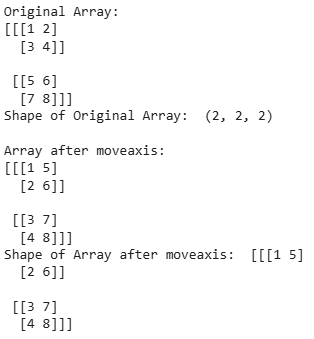
Output :
We have moved axis 0 (first axis) to position 2 (last position). result is an array where the original first dimension becomes the third dimension.
You can also move multiple axes at once by passing sequences to both the source and destination parameters.
Output :
Original shape: (2, 3, 4)
New shape: (3, 2, 4)
numpy.moveaxis()?transpose() or swapaxes(), moveaxis() is simple to use and rearrange the axes without complex permutations. By understanding the use of moveaxis(), you can streamline data manipulation tasks.