|
VOOZH | about |
|
VOOZH | about |
numpy.swapaxes() function allow us to interchange two axes of a multi-dimensional NumPy array. It focuses on swapping only two specified axes while leaving the rest unchanged. It is used to rearrange the structure of an array without altering its actual data. The syntax of numpy.swapaxes() is:
numpy.swapaxes(array, axis1, axis2)
where:
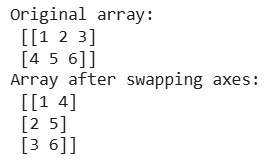
array : is the input array whose axes are to be swapped.axis1 : The first axis to be swapped.axis2 : The second axis to be swapped with axis1.For a 2D array, swapping axes is basically transposing the array.
Output:
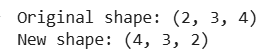
Suppose you have a 3D array with shape (2, 3, 4) and you want to swap the first axis (axis 0) with the last axis (axis 2).
Output :
In this example the axis at position 0 (size 2) has been swapped with the axis at position 2 (size 4) resulting in a new shape of (4, 3, 2).
While numpy.swapaxes() is ideal for swapping two axes there are other functions in NumPy that perform similar tasks:
1. numpy.transpose() :
swapaxes() for specified axis swapping.2. numpy.moveaxis() :
swapaxes() but requires specifying source and destination axes.For scenarios requiring simple interchange of two axes numpy.swapaxes() is the most efficient method.