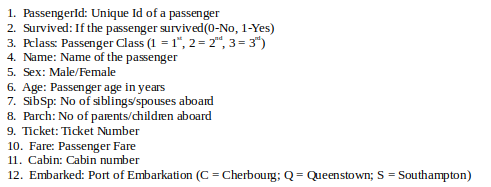
|
VOOZH | about |
|
VOOZH | about |
What is EDA?
Exploratory Data Analysis (EDA) is a method used to analyze and summarize datasets. Majority of the EDA techniques involve the use of graphs.
Titanic Dataset -
It is one of the most popular datasets used for understanding machine learning basics. It contains information of all the passengers aboard the RMS Titanic, which unfortunately was shipwrecked. This dataset can be used to predict whether a given passenger survived or not.
The csv file can be downloaded from Kaggle.
👁 Image
Code: Loading data using Pandas
Seaborn:
It is a python library used to statistically visualize data. Seaborn, built over Matplotlib, provides a better interface and ease of usage. It can be installed using the following command,
pip3 install seaborn
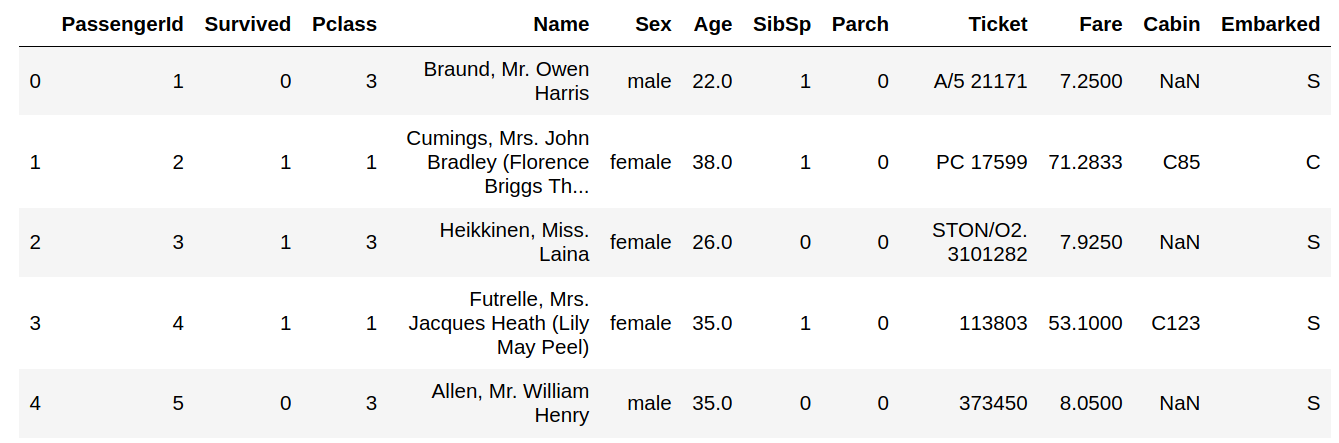
Code: Printing data head
Output :
👁 Image
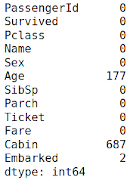
Code: Checking the NULL values
Output :
👁 Image
The columns having null values are: Age, Cabin, Embarked. They need to be filled up with appropriate values later on.
Features: The titanic dataset has roughly the following types of features:
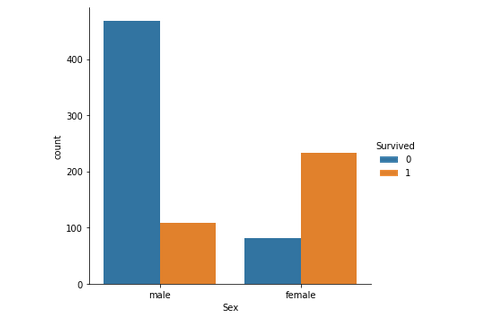
Code: Graphical Analysis
Output :
👁 ImageJust by observing the graph, it can be approximated that the survival rate of men is around 20% and that of women is around 75%. Therefore, whether a passenger is a male or a female plays an important role in determining if one is going to survive.
Code : Pclass (Ordinal Feature) vs Survived
Output:
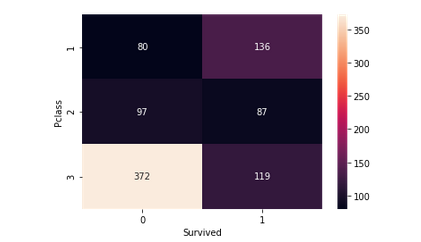
👁 ImageIt helps in determining if higher-class passengers had more survival rate than the lower class ones or vice versa. Class 1 passengers have a higher survival chance compared to classes 2 and 3. It implies that Pclass contributes a lot to a passenger's survival rate.
Code : Age (Continuous Feature) vs Survived
Output :
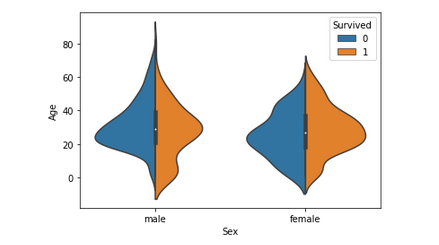
👁 ImageThis graph gives a summary of the age range of men, women and children who were saved. The survival rate is -
Since Age column is important, the missing values need to be filled, either by using the Name column(ascertaining age based on salutation - Mr, Mrs etc.) or by using a regressor.
After this step, another column - Age_Range (based on age column) can be created and the data can be analyzed again.
Code : Factor plot for Family_Size (Count Feature) and Family Size.
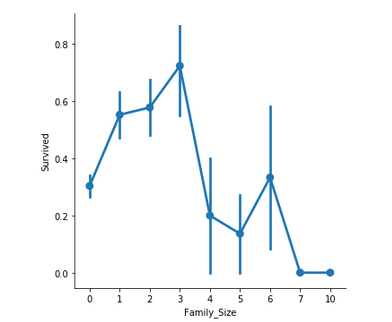
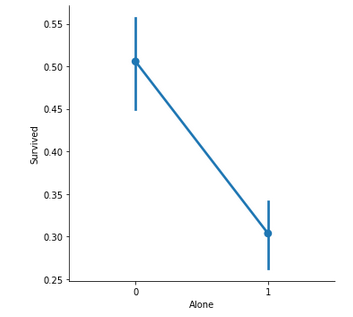
👁 ImageFamily_Size denotes the number of people in a passenger's family. It is calculated by summing the SibSp and Parch columns of a respective passenger. Also, another column Alone is added to check the chances of survival of a lone passenger against the one with a family.
Important observations -
Code : Bar Plot for Fare (Continuous Feature)
Output :
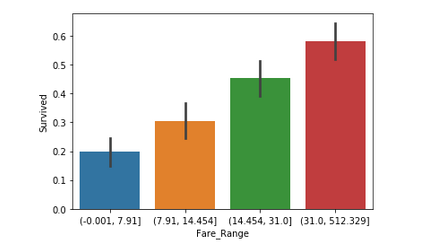
👁 ImageFare denotes the fare paid by a passenger. As the values in this column are continuous, they need to be put in separate bins(as done for Age feature) to get a clear idea. It can be concluded that if a passenger paid a higher fare, the survival rate is more.
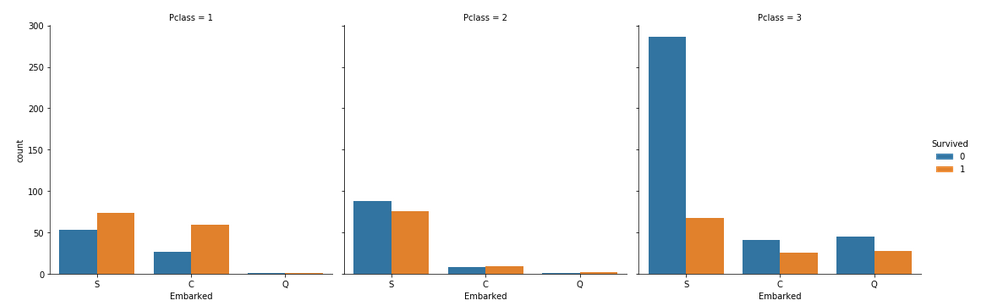
Code: Categorical Count Plots for Embarked Feature
👁 ImageSome notable observations are:
Conclusion :