|
VOOZH | about |
|
VOOZH | about |
Training machine learning or deep learning model is time-consuming and shutting down the notebook causes all the weights and activations to disappear as the memory is flushed. Hence, we save models for reusability, collaboration, and continuation of training.
Below are the methods for saving and loading machine learning models in TensorFlow.
👁 ImageHere are the methods that can be used to save model.
save() MethodThe save() method allows you to save the complete model including:
tensorflow.keras.X.save('location/model_name')
Where X can be a Sequential, Functional Model or Model subclass. The location specifies where the model is stored and if no path is specified it will be saved in the same location as the Python file.
To load the model use theload_model() method:
tensorflow.keras.models.load_model('location/model_name')
save_weights() MethodIn some cases you might want to save just the weights of the model instead of the entire model. This can be done using the save_weights()method which saves the weights of all the layers in the model.
tensorflow.keras.Model.save_weights('location/weights_name')
The weights_nameis the file name for the saved weights and if no path is provided it is saved in the same location as the Python file.
To load the saved weights use the load_weights() method:
tensorflow.keras.Model.load_weights('location/weights_name')
Note: When loading weights ensure that the model's architecture is the same as the one used to save the weights. For example you cannot load the weights of a model with two dense layers into a model with just one dense layer.
.h5)If you save your model with the .h5 extension the model is saved in HDF5 format. This format is portable and commonly used for storing large data and models. You can specify the .h5 extension when saving the model and TensorFlow will automatically save the model in this format.
model.save('my_model.h5')
If you don’t specify the extension, TensorFlow saves the model in its native format.
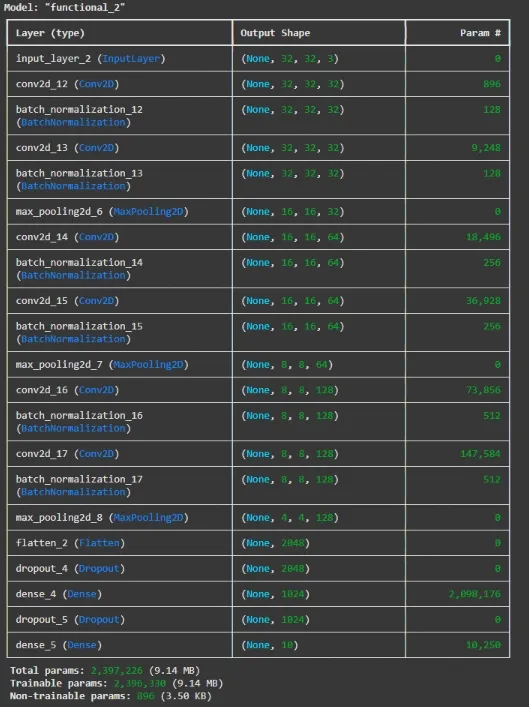
Here we will build a neural network and then save it.
We will importing tenserflow for model making.
Input, Conv2D, Dense, Flatten, Dropout, MaxPooling2D and BatchNormalization is imported to build neural networks.Modelto define the model architecture.load_modelto load saved models.The model contains following layers:
Conv2D(32, (3, 3), activation='relu', padding='same'): Adds a 2D convolutional layer with 32 filters, 3x3 kernel, ReLU activation and same padding to preserve the input dimensions.BatchNormalization(): Adds a batch normalization layer to normalize the output from the convolution layer speeding up training.MaxPooling2D((2, 2)): Adds a max pooling layer to reduce the spatial dimensions of the feature maps by a factor of 2.Output:
Output:
Model saved!
Model loaded successfully!
Saving and loading models is essential for efficient machine learning workflows, enabling you to resume training without starting from scratch and share models with others.