|
VOOZH | about |
|
VOOZH | about |
Now, you are searching for tf-idf, then you may familiar with feature extraction and what it is. TF-IDF which stands for Term Frequency – Inverse Document Frequency. It is one of the most important techniques used for information retrieval to represent how important a specific word or phrase is to a given document. Let’s take an example, we have a string or Bag of Words (BOW) and we have to extract information from it, then we can use this approach.
The tf-idf value increases in proportion to the number of times a word appears in the document but is often offset by the frequency of the word in the corpus, which helps to adjust with respect to the fact that some words appear more frequently in general. TF-IDF use two statistical methods, first is Term Frequency and the other is Inverse Document Frequency. Term frequency refers to the total number of times a given term t appears in the document doc against (per) the total number of all words in the document and The inverse document frequency measure of how much information the word provides. It measures the weight of a given word in the entire document. IDF show how common or rare a given word is across all documents. TF-IDF can be computed as tf * idf
👁 Image
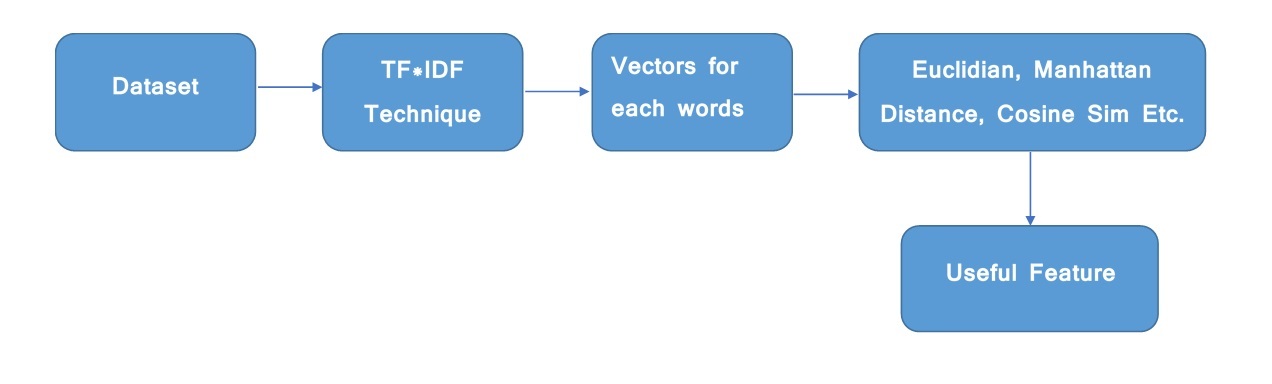
Tf*Idf do not convert directly raw data into useful features. Firstly, it converts raw strings or dataset into vectors and each word has its own vector. Then we’ll use a particular technique for retrieving the feature like Cosine Similarity which works on vectors, etc. As we know, we can’t directly pass the string to our model. So, tf*idf provides numeric values of the entire document for us.
To extract features from a document of words, we import –
from sklearn.feature_extraction.text import TfidfVectorizer
Input :
1st Sentence - "hello i am pulkit"
2nd Sentence - "your name is akshit"
Code : Python code to find the similarity measures
Output :
 manhattan cos_sim euclidean
0 2.955813 0.0 1.414214
Note: Dataset is large so it'll take 30-40 second to produce output and If you are going to run as it is, then it's not gonna work. It only works when you copy this code in your IDE and provide your dataset in tfidf function.