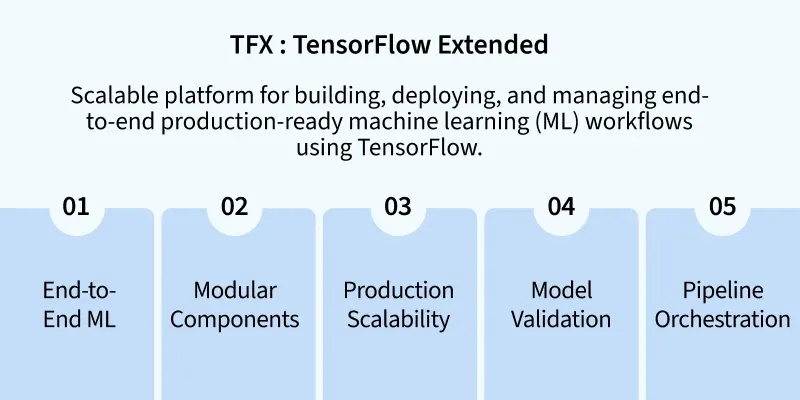
TensorFlow Extended (TFX) is an end-to-end platform for deploying and managing production ML pipelines. It’s designed to take ML models from research to scalable production with stability, consistency and repeatability.
Production-Ready ML Pipelines: TFX is specifically built for managing machine learning in production, ensuring high performance and reliability. It supports reusability and scalability in large-scale ML environments.
Component-Based Architecture: TFX pipelines are modular, consisting of reusable components like data preprocessing, training, evaluation and serving. Each component is independently configurable and can be reused across multiple pipelines.
Integration with TensorFlow Ecosystem: It works seamlessly with TensorFlow tools such as TensorFlow Data Validation, Transform, Model Analysis and TFLite. This deep integration ensures consistency across the model lifecycle.
Scalable and Portable: TFX runs on various orchestration engines like Apache Airflow, Kubeflow Pipelines and Apache Beam. This allows models to scale across different infrastructure environments including cloud and on-premises systems.
Installation of TFX: Tensorflow Extended
There are two main steps to install TFX depending on your environment:
TFX Installation
pip install tfx
Check Installation
python -c "import tfx; print(tfx.__version__)"
TFX versions depend on TensorFlow versions and Python Environment versions. Make sure you're using compatible versions. In case of installation error, check compatibility and proceed accordingly. You are advised to perform installation in local environment.
How can TFX be used?
Real-Time Model Deployment: Use TFX to automatically deploy models after training and validation in systems like TensorFlow Serving or Google Cloud AI Platform.
Model Governance and Reproducibility: TFX ensures that each model is traceable, with versioned datasets and code, which is crucial in regulated industries.
Data and Model Validation at Scale: Automatically catch data quality issues and underperforming models before they reach production.
Cross-Platform ML Pipelines: You can run the same TFX pipeline on local machines, Google Cloud Vertex AI or Kubernetes environments via Kubeflow.
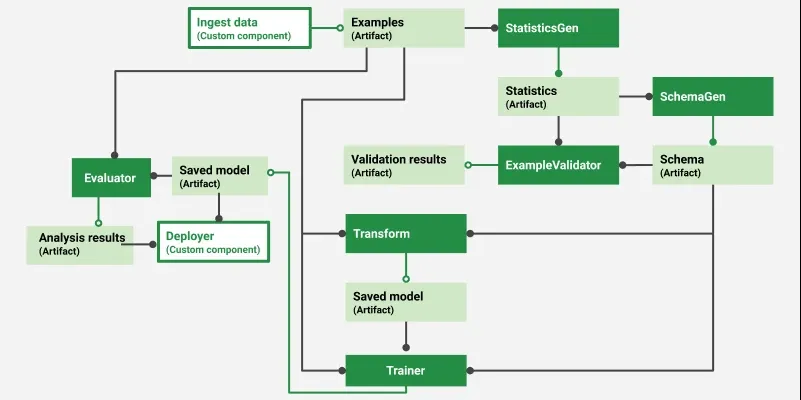
Each of these are Python classes or modules that get plugged into a TFX pipeline.
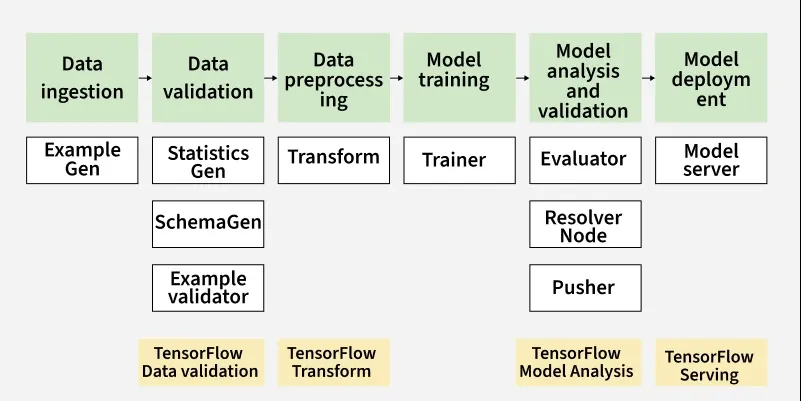
ExampleGen: Ingests and splits raw data (CSV, TFRecord, BigQuery, etc.) into training and evaluation datasets. It's the entry point of the TFX pipeline and supports data shuffling and versioning.
StatisticsGen: Generates descriptive statistics about the data using TensorFlow Data Validation (TFDV). This helps detect anomalies, missing values or skewness in the datasets.
SchemaGen: Uses statistics from StatisticsGen to automatically infer the schema of your data. The schema helps validate and monitor data consistency throughout the pipeline.
ExampleValidator: Detects anomalies and missing features in input data using schema and statistics. Prevents dirty or unexpected data from affecting model performance.
Transform: Performs feature engineering and preprocessing using TensorFlow Transform. It also ensures the same transformations are applied during both training and serving.
Trainer: Trains the ML model using TensorFlow and your custom training code. You define a run_fn() in a Python module that TFX will call for training.
Evaluator: Analyzes model performance using TensorFlow Model Analysis (TFMA). It performs slicing-based evaluation to ensure your model performs well across different data subsets.
InfraValidator: Validates whether a trained model can be served in production without crashing or errors. It performs a test deployment in a sandboxed environment.
Pusher: Pushes the validated model to a serving infrastructure such as TensorFlow Serving or TFLite. This is the final step of the pipeline, making the model available for use.
TFX: Tensorflow Extended Pipeline Workflow
A TFX pipeline workflow is an end-to-end sequence of stages that automates the process of building, training, validating and deploying machine learning models at scale using TensorFlow. Each stage is a component with a specific task and together they form a modular and reproducible pipeline.
Responsible for importing data into the pipeline from different sources such as CSVs, TFRecords, BigQuery, etc.
It splits data into training and evaluation sets and converts them into TensorFlow Example format.
This is the first component that kicks off the pipeline by standardizing the raw input.
2. StatisticsGen
Computes statistics over the dataset to understand distributions, missing values, etc.
Uses TensorFlow Data Validation (TFDV) internally to generate descriptive statistics.
These stats help in understanding data quality and are used by SchemaGen.
3. SchemaGen
Automatically infers the data schema from statistics generated by StatisticsGen.
The schema includes types, ranges, shapes and domains of each feature.
Helps in validating data and detecting anomalies during training or serving.
4. ExampleValidator
Detects anomalies and data drift by comparing statistics against the schema.
Ensures that training data is clean, consistent and adheres to expectations.
Prevents issues such as schema violations, missing features and type mismatches.
5. Transform
Performs feature transformations using TensorFlow Transform.
Ensures that the same transformations are applied in both training and serving environments.
Produces a tf.TransformGraph used for model training and online inference.
6. Trainer for Model Training
Trains a TensorFlow model using the preprocessed data.
Supports custom training code and can use Estimators, Keras models or TF 2.x style training.
Outputs a saved model which is used for evaluation and deployment.
7. Evaluator for Evaluation
Uses TensorFlow Model Analysis (TFMA) to evaluate model performance.
Compares metrics such as accuracy, AUC and checks fairness or thresholds.
Can perform blessing, i.e., only allows model to be pushed if it meets criteria.
8. InfraValidator
Checks whether the model can be loaded and served in the production environment.
Simulates a model server environment and validates model load success.
Prevents pushing a broken or incompatible model to production.
9. Pusher
If model passes validation, this component pushes it to a serving infrastructure.
Supports destinations like TensorFlow Serving, Cloud AI Platform, etc.
Marks the end of the pipeline with a production-ready model.
Common Functions of TFX
In a TFX (TensorFlow Extended) pipeline, you can implement several custom functions to define the behavior of each pipeline component. Below are some common functions that developers often implement to customize ML workflows.
Preprocessing Function: Used in Transform Component to define feature engineering logic like scaling, bucketing, etc.
Run Function: Used in Trainer Component to define the entire training logic, including model building, compiling, training and saving.
Build Model Function: Used inside Run Function to define the Tensorflow or Keras Model Architecture.
Input Function: Used in Trainer and Evaluator Components to convert TFRecord files into datasets for training or evaluation.
Eval Input Receiver Function: Used in Evaluator Component to create model analysis input function.
Serving Input Receiver Function: Used in Trainer Component during Model Export to define how the model receives inputs when it is deployed.
Get Hyperparameters Function: Used in Tuner Component for Hyperparameter Tuning which is optional. It helps define hyperparameter search space.
Tuner Function: Used in Tuner Component to integrate hyperparameter tuning logic using KerasTuner or others.
Popular Applications of TFX
Real-Time Recommendation Systems: Continuous training and serving of recommendation models based on user activity. Large-scale pipelines for real-time personalized recommendations (e.g., Google Play).
Fraud Detection: Automated pipelines for model retraining based on new transaction data and anomaly patterns. Ensures traceability, auditability and consistency in deploying credit risk or loan prediction models.
Healthcare Predictions: Data validation and transformation pipelines that maintain model integrity for sensitive health data. TFX can be used in healthcare workflows to deploy and monitor predictive models in a reproducible way.
Search Engine Ranking: Regularly updating models using user clickstream and feedback data.
Personal Assistants: NLP-based intent detection and contextual model serving pipelines.
What is the difference between TensorFlow and TensorFlow Extended (TFX)?
TensorFlow is an open-source library primarily used for building and training machine learning models.
On the other hand, TFX (TensorFlow Extended) is a production-ready platform built on top of TensorFlow.