|
VOOZH | about |
|
VOOZH | about |
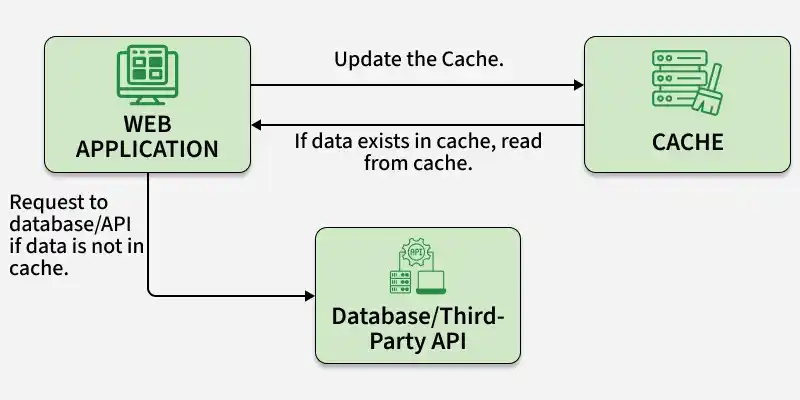
Django caching improves performance by storing frequently used data and reducing repeated database queries.
Consider a project named 'core' having an app named 'src'.
pip install django-redis
Redis is an in-memory data store used in Django as a high-performance caching backend to enable fast data access and reduce database load.
Note: Redis must be installed and running on the system before using caching features.
In src/models.py:
The models define the database structure. Category stores recipe categories, and Recipe stores recipe details linked to a category.
In src/admin.py:
This enables model management through the Django admin panel.
In src/views.py:
The home view retrieves all recipes from the database. The view_recipe view checks the cache first and fetches data from the database only if it is not already cached.
URLs defined at the project level route requests to views inside the src app.
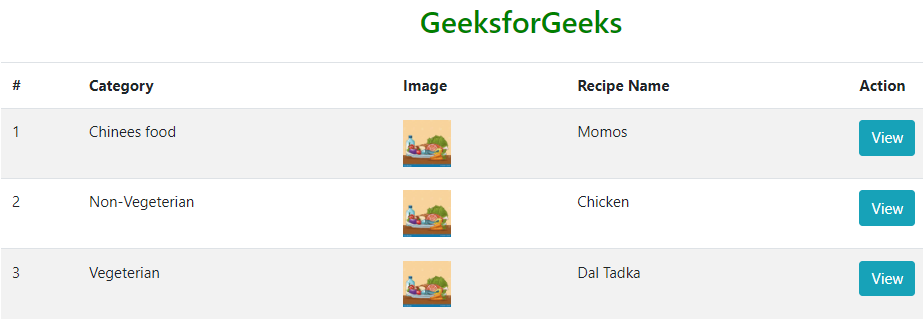
In src/templates/home.html: This HTML page is used to view the home page of the project.
In src/templates/view.html: This HTML file is used to present the data which is being saved by the cache.
python manage.py makemigrations
python manage.py migrate
python manage.py runserver