|
VOOZH | about |
|
VOOZH | about |
Working with CSV files is a common task in data manipulation and analysis, and Python provides versatile tools to streamline this process. Here, we have an existing CSV file and our task is to add a new column to the existing CSV file in Python. In this article, we will see how we can add a column to a CSV file in Python.
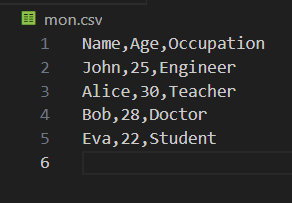
Below, are examples of how to Add a New Column to an Existing CSV File in Python. Let's consider an example of an existing CSV file with some sample data. Suppose your existing CSV file, namedmon.csv, looks like this:
mon.csv
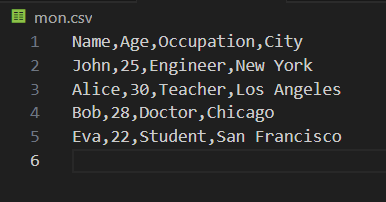
Pandas is a powerful data manipulation library in Python that makes working with tabular data seamless. Here's how you can use Pandas to add a new column to an existing CSV file: In this example, below Python code utilizes the Pandas library to add a new 'City' column with predefined values to an existing CSV file ('mon.csv'). It reads the CSV into a DataFrame, appends the new column, and writes the updated DataFrame back to the same CSV file.
Output:
The built-in csv module in Python also allows us to work with CSV files. Here's how you can add a new column using the csv module: In this example, below code reads the content of an existing CSV file named 'mon.csv' into a list of lists using the CSV module. It then adds a new column header 'City' to the first row and appends corresponding values to each subsequent row from the 'new_city_values' list
Output: