VOOZH about

URL: https://www.geeksforgeeks.org/python/add-multiple-columns-to-dataframe-in-pandas/

⇱ Add multiple columns to dataframe in Pandas - GeeksforGeeks


  • Courses
  • Tutorials
  • Interview Prep

Add multiple columns to dataframe in Pandas

Last Updated : 3 Oct, 2022

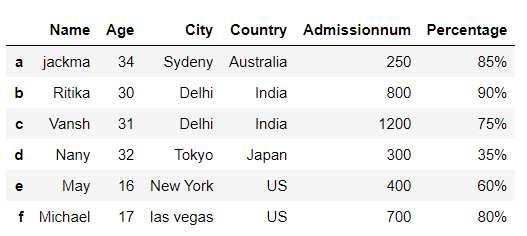
In Pandas, we have the freedom to add columns in the data frame whenever needed. There are multiple ways to add columns to pandas dataframe. 

Add multiple columns to a DataFrame using Lists

Output :

👁 Add DataFrame columns using Lists
Add DataFrame columns using Lists

Add multiple columns to a data frame using Dataframe.assign() method

Using DataFrame.assign() method, we can set column names as parameters and pass values as list to replace/create the columns.

Output :

👁 Added multiple columns using DataFrame assign() Method
Added multiple columns using DataFrame assign() Method

Add multiple columns to a data frame using Dataframe.insert() method

Using DataFrame.insert() method, we can add new columns at specific position of the column name sequence. Although insert takes single column name, value as input, but we can use it repeatedly to add multiple columns to the DataFrame. 

Output :

👁 Added multiple columns using DataFrame insert() Method
Added multiple columns using DataFrame insert() Method

Add multiple columns to a data frame using Dictionary and zip()

Using Dict and zip() we can create a mapping of key values, which can be assigned to a new column name.

Output :

👁 Added multiple columns using Dictionary and zip()
Added multiple columns using Dictionary and zip()
Comment