|
VOOZH | about |
|
VOOZH | about |
We are given an XML existing file and our task is to append new data into that existing XML using Python. In this article, we will see how we can append new data to the existing XML using Python.
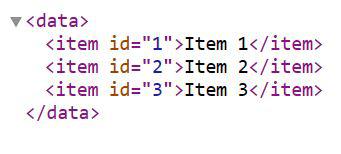
In this example, an XML tree is constructed using the xml.etree.ElementTree module in Python, where child elements with attributes and text are added to the root element. Finally, the tree is written to a file named "sample.xml". We will use this file in our article for further operations.
Output: sample.xml
Below are some of the ways by which we can add new data into the existing XML file in Python:
In this example, the script loads an XML file, adds a new item with an ID and text, then saves the modified XML back to the file using ElementTree in Python.
Output: sample.xml
In this example, the script utilizes the lxmllibrary to parse an XML file, adds a new item with an ID and text, then saves the modified XML back to the file with formatting.
Output: sample.xml
In this example, using the xml.dom.minidom module, the script loads an XML file, adds a new item with an ID and text, then saves the modified XML back to the file.
Output: sample.xml
The provided code snippets demonstrate different approaches to appending data to an existing XML file in Python. Whether using the built-in ElementTree module, the lxml library, or xml.dom.minidom, each method achieves the same goal with slight variations in syntax and functionality. These examples offer flexibility for developers to choose the XML manipulation method that best suits their project requirements and preferences.