|
VOOZH | about |
|
VOOZH | about |
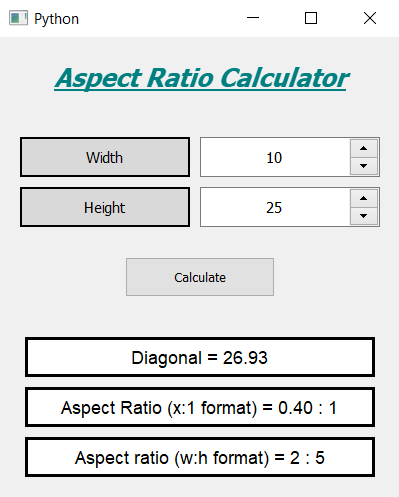
In this article we will see how we can create a aspect ratio calculator using PyQt5. The aspect ratio of an image is the ratio of its width to its height. It is commonly expressed as two numbers separated by a colon, as in 16:9. For an x:y aspect ratio, the image is x units wide and y units high. Below is how the calculator will look
PyQt5 is cross-platform GUI toolkit, a set of python bindings for Qt v5. One can develop an interactive desktop application with so much ease because of the tools and simplicity provided by this library. Below is the command to install the PyQt5
pip install PyQt5
Concept:
User has to select a width and height for which calculator will find the diagonal and aspect ratio values, below is the formula for calculating diagonal
diagonal = math.sqrt(width**2 + height**2)
Below is the formula for calculating aspect Ratio (x:1 format)
x = width / height
Below is the formula for calculating aspect Ratio (width:height format)
w = width / gcd
h = height / gcd
Here gcd is the Highest Common Factor (HCF) of width and height
GUI Implementation Steps :
1. Create a heading label that display the calculator name
2. Create two labels for telling user to enter width and height
3. Create two spin box for entering width and height
4. Create a push button for calculating the ratios
5. Create three result labels for showing three various resultsBack-End Implementation :
1. Set range to each of the spin box with minimum value equal to 1 so that user can't enter 0 as input
2. Set various properties like alignment, geometry to each of the widget in the window
3. Add action to the push button when it get clicked
4. Inside the push button action get the width and height from the spin boxes
5. Calculate the diagonal value and do formatting of it and show the diagonal value with the help of first result label
6. Calculate the aspect ratio by diving each other this will prove aspect ratio in x : 1 format
7. Show this ratio with the help of second result label
8. Find the gcd of width and height with the help of Euclidean Algorithm
9. Divide the width and height with the gcd
10. Show the new width and height in aspect ratio format with the help of third label
Below is the implementation
Output :