Prerequisites: Python GUI – tkinter
The Listbox widget is used to display a list of items from which a user can select a number of items. But have you ever wondered, how to return the list of possible results when a key is pressed? Let's see the following approach towards the same.
Working of Program
- List consisting of words is initialized.
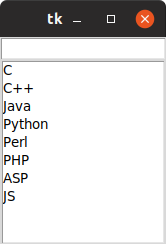
- Entry box and Listbox are created and are added to the root window.
- Bind function is used for event handling. Key release event is handled for an Entry field.
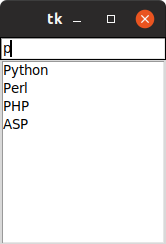
- When any key is pressed in the Entry,
checkkey() function is called.
checkkey() function then compares the entered string with existing list keywords and populates Listbox with matching keywords.
- Then this data is sent to update function which then updates the Listbox.
Below is the approach.
Output:
👁 Image
👁 python-listbox