|
VOOZH | about |
|
VOOZH | about |
In this article, we will learn how to find the average over every n element of a NumPy array. For doing our task, we will some inbuilt methods provided by NumPy module which are as follows:
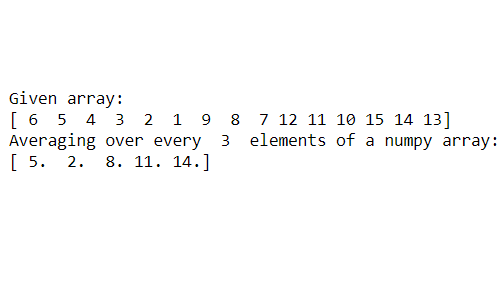
Example 1: Average over a 1-D array
Output:
👁 ImageNote: N should be an integer multiple of the size of 1d array.
Example 2: Average over a 1-D array(Row-wise)
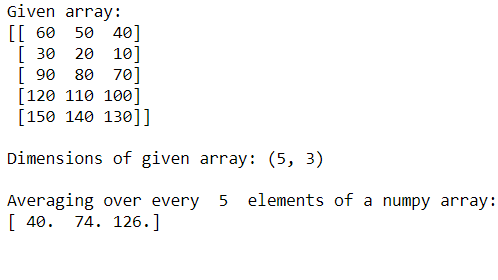
Here we have taken an array of dimensions (5,3) i.e it has 5 rows and 3 columns. Since the axis=1, it will reshape the elements in groups of n and then calculate the average row-wise using axis=1.
Output:
👁 ImageExample 3: Average over a 1-D array(Column-wise)
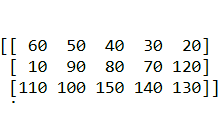
Remember we need to give the axis=1 only then it can group elements row-wise starting from the 0th index. Now if we change the axis value to 0, then after reshaping in groups of n, it will perform the average operation column-wise as given below which will not give us the desired result. It is best if we want to calculate the average column-wise.
After reshaping the 2D array it looks like below:
👁 ImageThen performing the average column wise we get the answer.
Output:
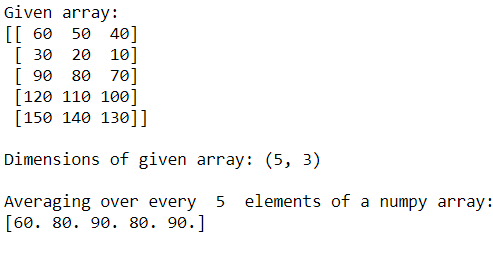
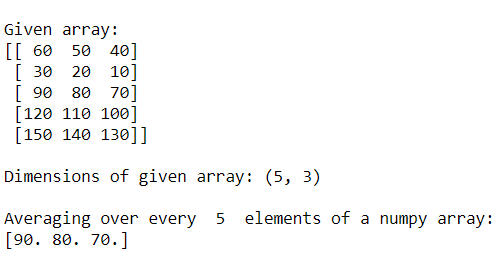
👁 ImageExample 4: Average over a 1-D array(Column-wise without reshaping)
Note here that taking axis=0 we cannot perform the average row-wise over every n element. It will just calculate the average of each column separately. The below code will calculate the average over every column element.