|
VOOZH | about |
|
VOOZH | about |
Virtual desktop assistant is an awesome thing. If you want your machine to run on your command like Jarvis did for Tony. Yes it is possible. It is possible using Python. Python offers a good major library so that we can use it for making a virtual assistant. Windows has Sapi5 and Linux has Espeak which can help us in having the voice from our machine. It is a weak A.I.
pyttsx3: pyttsx is a cross-platform text to speech library which is platform independent. The major advantage of using this library for text-to-speech conversion is that it works offline. To install this module type the below command in the terminal.
pip install pyttsx3
SpeechRecognition: It allow us to convert audio into text for further processing. To install this module type the below command in the terminal.
pip install SpeechRecognition
webbrowser: It provides a high-level interface which allows displaying Web-based documents to users. To install this module type the below command in the terminal.
pip install webbrowser
Wikipedia: It is used to fetch a variety of information from the Wikipedia website. To install this module type the below command in the terminal.
pip install wikipedia
Speak Method will help us in taking the voice from the machine. Here is the code explanation of Speak Method
This method will check for the condition. If the condition is true it will return output. We can add any number if conditions for it and if the condition satisfy we will get the desired output.
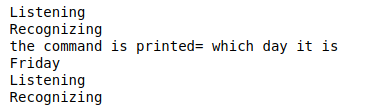
This method is for taking the commands and recognizing the command from the speech_Recognition module
This is just used to greet the user with a hello message.
Main method is the method where all the files get executed so we will call the Take_query method here so that it can recognize and tell or give us the desired output.