Building Powerful Telegram Bots with Telethon in Python
Last Updated : 19 Jun, 2024
Creating a Telegram bot can significantly enhance how you interact with users, automate tasks, and provide information quickly. Here, we'll use the Telethon library in Python to build a powerful Telegram bot.
Creating Telegram Bot in Python
Prerequisites
Telegram Account: We need a Telegram account to create and manage our bot.
Telethon Library: We'll use Telethon, a Python library for interacting with Telegram's API.
Step 1: Install Telethon
pip install telethon
Step 2: Set Up the Telegram Bot
Open Telegram and search for @BotFather.
Start a chat and send the /newbot command.
Follow the instructions to create a new bot. Then we'll receive a bot token, which we need for authentication.
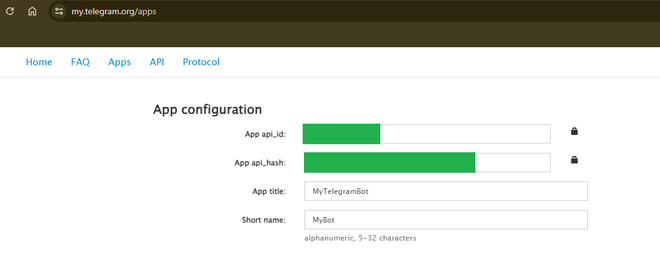
Step 3: Create a New Application
Visit my.telegram.org and log in with our Telegram account.
Go to the API Development Tools and create a new application.
Logging Setup: Configures logging to help debug the bot.
Telegram Client Initialization: Uses api_id, api_hash, and bot_token to create and start the Telegram client.
Command Handlers:
/start: Greets the user and offers assistance.
/help: Provides a list of commands the bot can respond to.
/info: Gives information about the bot.
/echo <message>: Echoes back the message sent by the user.
Keyword-based Responses: Responds to specific keywords and phrases with predefined messages.
Default Response: Provides help information if the user's message doesn't match any known commands or keywords.
Step 5: Run the Bot
python telegram_bot.py
Output:
Conclusion
Building a Telegram bot with Telethon in Python is both rewarding and educational. This guide covers setting up the bot, handling various commands, and responding intelligently to user inputs. Using the Telethon library, the bot can efficiently manage interactions, provide information, and automate tasks. This foundation allows for further expansion of the bot's features, integration with other services, and improved user engagement. Creating and customizing a Telegram bot offers valuable skills in API usage, Python programming, and real-time interaction management, paving the way for more advanced projects in the future.