VOOZH about

URL: https://www.geeksforgeeks.org/python/chain-multiple-decorators-in-python/

⇱ Chain Multiple Decorators in Python - GeeksforGeeks


  • Courses
  • Tutorials
  • Interview Prep

Chain Multiple Decorators in Python

Last Updated : 11 Jun, 2026

Decorator chaining is the process of applying multiple decorators to a single function. Each decorator wraps the function and adds its own functionality, allowing multiple behaviors to be combined without modifying the original code. Following sections explains how decorator chaining works, the order of execution and how multiple decorators interact with one another.

Example: Chaining Multiple Decorators


Output
Decorator 1 - Before Function
Decorator 2 - Before Function
Hello, World!
Decorator 2 - After Function
Decorator 1 - After Function

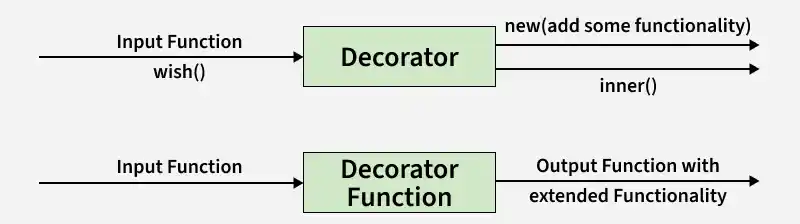
Decorator

A decorator is a function that can take a function as an argument and extend its functionality and return a modified function with extended functionality.

👁 2

Order of Execution in Decorator Chaining

When multiple decorators are used, Python applies them from the bottom up. The decorator closest to the function is applied first, and the resulting function is then passed to the decorator above it. This order determines how the decorators interact and affect the final behavior of the function.

Example:

is equivalent to:

Here, decor2 wraps the original num() function first, and the function returned by decor2 is then wrapped by decor1.

Explanation:

  • Apply Decorators Bottom-Up: The decorator nearest to the function is applied first.
  • Wrap Functions Sequentially: Each decorator receives and wraps the function returned by the previous decorator.
  • Determine Execution Order: The order of decorators affects how the function is processed and what output is produced.
  • Combine Multiple Behaviors: Each decorator contributes its own functionality to the final wrapped function.

Syntax of decorator:

@decor1
@decor2
def num():
pass

Example 1:  Two decorators are applied to num() to demonstrate decorator chaining. Python applies decorators from the bottom up, so @decor executes first and its result is then passed to @decor1 for further processing.


Output
400

Explanation:

  • decor1 takes a function as input and returns a wrapper function that squares the value returned by the original function.
  • decor takes a function as input and returns a wrapper function that doubles the value returned by the original function.
  • Both decorators are applied to num() using the @ syntax.
  • Python interprets the decorators as num = decor1(decor(num)), so decor is applied first and decor1 is applied afterward.
  • When num() is called, it initially returns 10.

Example 2: Multiple decorators are applied to sayhellogfg() to show how decorator chaining works. Each decorator contributes its own behavior, resulting in a combined effect when the function is executed.


Output
************
@@@@@@@@@@@@
Hello
@@@@@@@@@@@@
************
GeekforGeeks

Explanation:

  • decor1 and decor2 define wrapper functions that print messages before and after executing the original function.
  • Both decorators are applied to sayhellogfg() using the @ syntax.
  • Python interprets the decorators as sayhellogfg = decor1(decor2(sayhellogfg)).
  • When sayhellogfg() is called, decor1 executes first, followed by decor2, and then the original function.

Decorators With Arguments

Decorators can also accept arguments, allowing their behavior to be customized when applied to a function. These decorators return another decorator function, which then wraps the target function. Multiple parameterized decorators can be chained in the same way as regular decorators.

Example:


Output
Welcome
Hello
Hello

Explanation:

  • Accept Parameters: repeat() and message() receive arguments when the decorators are applied.
  • Return Decorators: Each function returns a decorator that wraps the target function.
  • Chain Parameterized Decorators: Multiple decorators with arguments can be stacked using the @ syntax.
  • Apply in Order: Python first applies @repeat(2) and then wraps the result with @message("Welcome").
  • Customize Function Behavior: Decorator arguments make decorators more flexible and reusable.

Related Articles

Comment
Article Tags: