|
VOOZH | about |
|
VOOZH | about |
Djongo is a SQL-to-MongoDB query transpiler that allows Django projects to use MongoDB as the backend database without modifying the Django ORM. It enables seamless integration with minimal configuration changes.
Djongo works by translating SQL queries generated by Django ORM into MongoDB query documents, allowing Django to interact with MongoDB without modifying its core features.
Follow these steps to set up a Django project with MongoDB as the backend using Djongo.
Step 1: Setup Virtual Environment
virtualenv myenv
myenv\Scripts\activate
Step 2: Install Django
pip install django
Step 3: Install Djongo
pip install djongo
Step 4: Start Django Project
django-admin startproject geeks_project
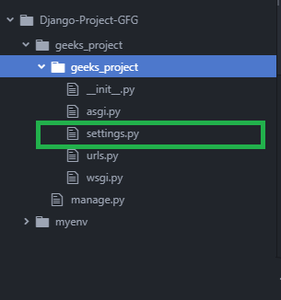
Your project structure will look like this :
Step 5: Make changes to settings.py file
Now, open settings.py file. Comment out or remove previous SQL Database configuration and add the following code in settings.py file :settings.py
 DATABASES = {
 'default': {
 'ENGINE': 'djongo',
 'NAME': 'your-database-name',
 }
 }
👁 Image
Now you can Use MongoDB as a backend database for your django project, without changing a single django model.