|
VOOZH | about |
|
VOOZH | about |
In this article, we are going to see how to convert any Dates in Spreadsheets using Python.
Used file:
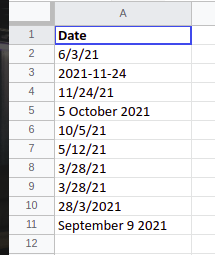
👁 ImageThis file comprises a single column entitled 'Date' and stores random dates of 2021 in some different forms of format.
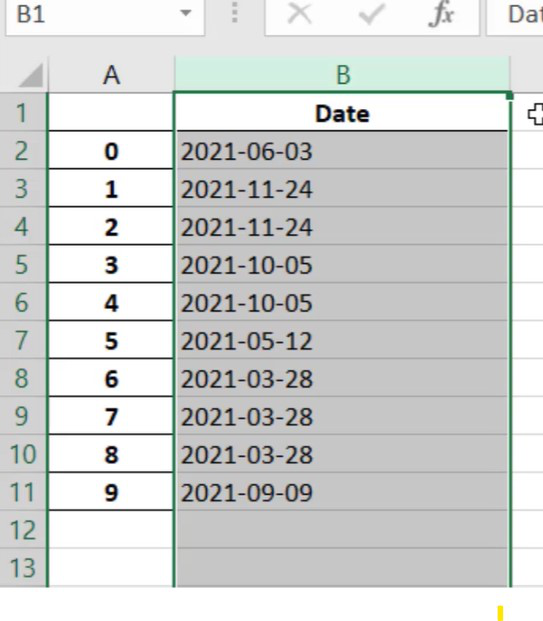
sample_dates["Date"] = pd.to_datetime(sample_dates["Date"]).dt.strftime("%Y-%m-%d")
sample_dates["Date"] = pd.to_datetime(sample_dates["Date"])
Output:
👁 ImageExample date - Saturday, 18 December, 2021, 7:00 PM
| Directive | Meaning | Example |
|---|---|---|
| %a | Weekday as locale's abbreviated name |
Sun, Mon,.....,Sat(en_US); So, Mo,.....,Sa(de_DE) |
| %A | Weekday as locale full name | Sunday, Monday, ....., Saturday |
| %w | Weekday as a decimal number, where 0 is Sunday and 6 is Saturday | 0, 1, 2, 3......,6 |
| %d | Day of the month as a zero-padded decimal number | 01,02,....31 |
We're going to use the same dataset that we used in the last example.
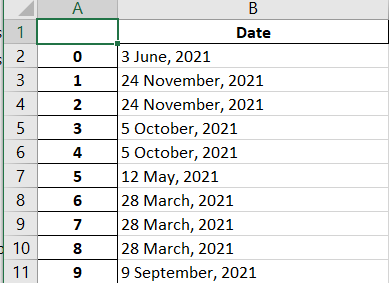
Format - "%d %b, %Y" -> "18 December, 2021"
Here we will use '%#d' to remove the padding of zero from the day, i.e. 08 to 8. This will not do padding of zero if the date is in single digit. We can use '%-d' on Linux.
Output:
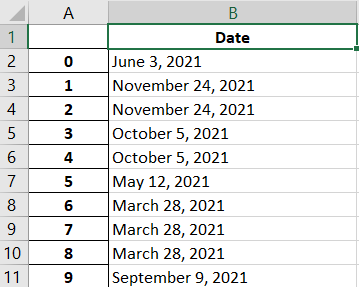
👁 ImageHere we will use different format
Format - "%B %d, %Y" -> "December 18, 2021"