|
VOOZH | about |
|
VOOZH | about |
In this article, we will discuss how can we convert nested JSON to CSV in Python.
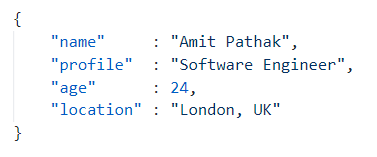
An example of a simple JSON file:
As you can see in the example, a single key-value pair is separated by a colon (:) whereas each key-value pairs are separated by a comma (,). Here, "name", "profile", "age", and "location" are the key fields while the corresponding values are "Amit Pathak", "Software Engineer", "24", "London, UK" respectively.
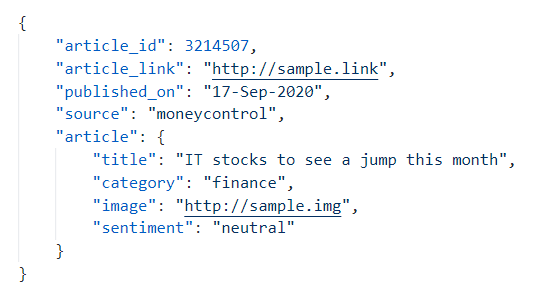
A nested JSON is a structure where the value for one or more fields can be an another JSON format. For example, follow the below example that we are going to use to convert to CSV format.
An example of a nested JSON file:
In the above example, the key field "article" has a value which is another JSON format. JSON supports multiple nests to create complex JSON files if required.
Our job is to convert the JSON file to a CSV format. There can be many reasons as to why we need to perform this conversion. CSV are easy to read when opened in a spreadsheet GUI application like Google Sheets or MS Excel. They are easy to work with for Data Analysis task. It is also a widely excepted format when working with tabular data since it is easy to view for humans, unlike the JSON format.
File used: article.json file
{
 "article_id": 3214507,
 "article_link": "http://sample.link",
 "published_on": "17-Sep-2020",
 "source": "moneycontrol",
 "article": {
 "title": "IT stocks to see a jump this month",
 "category": "finance",
 "image": "http://sample.img",
 "sentiment": "neutral"
 }
}
Example: Converting JSON to CSV
Output:
The same can be achieved through the use of Pandas Python library. Pandas is a free source python library used for data manipulation and analysis. It performs operations by converting the data into a pandas.DataFrame format. It offers a lot of functionalities and operations that can be performed on the dataframe.
Example: JSON to CSV conversion using Pandas
Output:
The above two examples are good when we have a single level of nesting for JSON but as the nesting increases and there are more records, the above codes require more editing. We can handle such JSON with much ease using the pandas library. Let us see how.
Any number of nesting and records in a JSON can be handled with minimal code using "json_normalize()" method in pandas.
Syntax:
json_normalize(data)
File in use: details.json file
{
 "details": [
 {
 "id": "STU001",
 "name": "Amit Pathak",
 "age": 24,
 "results": {
 "school": 85,
 "high_school": 75,
 "graduation": 70
 },
 "education": {
 "graduation": {
 "major": "Computers",
 "minor": "Sociology"
 }
 }
 },
 {
 "id": "STU002",
 "name": "Yash Kotian",
 "age": 32,
 "results": {
 "school": 80,
 "high_school": 58,
 "graduation": 49
 },
 "education": {
 "graduation": {
 "major": "Biology",
 "minor": "Chemistry"
 }
 }
 },
 {
 "id": "STU003",
 "name": "Aanchal Singh",
 "age": 28,
 "results": {
 "school": 90,
 "high_school": 70,
 "graduation":65
 },
 "education": {
 "graduation": {
 "major": "Art",
 "minor": "IT"
 }
 }
 },
 {
 "id": "STU004",
 "name": "Juhi Vadia",
 "age": 23,
 "results": {
 "school": 95,
 "high_school": 89,
 "graduation": 83
 },
 "education": {
 "graduation": {
 "major": "IT",
 "minor": "Social"
 }
 }
 }
 ]
}
Here the "details" key consists of an array of 4 elements, where each element contains 3-level of nested JSON objects. The "major" and "minor" key in each of these objects is in a level 3 nesting.
Example: Converting n-nested JSON to CSV
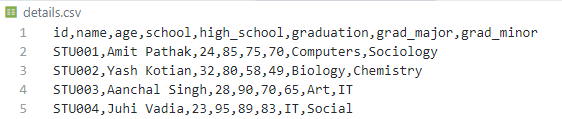
Output:
$ Console Output
-----
Normalized Columns: ['id', 'name', 'age', 'results.school', 'results.high_school', 'results.graduation', 'education.graduation.major', 'education.graduation.minor']
Renamed Columns: ['id', 'name', 'age', 'school', 'high_school', 'graduation', 'grad_major', 'grad_minor']