|
VOOZH | about |
|
VOOZH | about |
Given a text file, the task is to count the number of lines it contains. This is a common requirement in many applications such as processing logs, analyzing datasets, or validating user input.
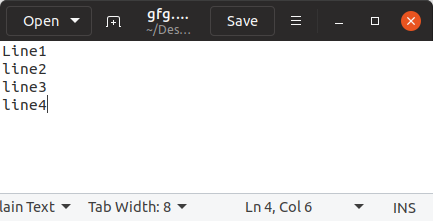
Example: Input file (myfile.txt)
👁 ImageOutput: Total Number of lines: 4
Below are the methods that we will used to count the lines in a text file:
Count lines efficiently by summing 1 for each line while iterating through the file.
Output
Total Number of lines: 4
Explanation: lines = sum(1 for line in fp) Counts each line efficiently without loading the whole file.
enumerate() method adds a counter to an iterable. We can use it to count lines efficiently.
Output
Total Number of lines: 4
Explanation:
Count lines by iterating through the file line by line with a simple counter.
Output
Total number of lines in the file: 4
Explanation: for line in file: counter += 1: Iterates over each line in the file and increments the counter.
readlines() method reads all lines in a file at once and returns them as a list. This method is suitable for small files.
Output
Total Number of lines: 4
Explanation: lines = len(fp.readlines()) Reads all lines into a list and counts them.