|
VOOZH | about |
|
VOOZH | about |
MongoDB is a general-purpose, document-based, distributed database built for modern application developers and the cloud. It is a document database, which means it stores data in JSON-like documents. This is an efficient way to think about data and is more expressive and powerful than the traditional table model. MongoDB has no separate command to create a database. Instead, it uses the use command to create a database. The use command is used to switch to the specific database. If the database name specified after the use keyword does not exist, then a new database is created with the specified name.
To use Python in MongoDB, we are going to import PyMongo. From that, MongoClient can be imported which is used to create a client to the database. Using the client, a new database can be created.
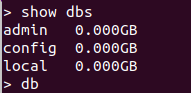
Example:List of databases using MongoDB shell (before)👁 python-create-database-mongodb1
Output
Database is created!!
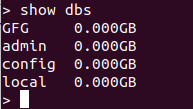
In the above example, it is clearly shown how a database is created. When creating a client, the local host along with its port number, which is 27017 here, is passed to the MongoClient. Then, by using the client, a new database named 'GFG' is created. We can check if the database is present in the list of databases using the following code: