In an
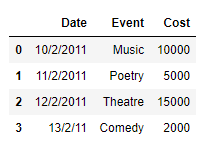
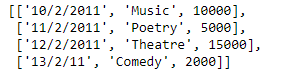
earlier post, we had discussed some approaches to extract the rows of the dataframe as a Python's list. In this post, we will see some more methods to achieve that goal.
Note : For link to the CSV file used in the code, click
here.
Solution #1: In order to access the data of each row of the Pandas dataframe, we can use
DataFrame.iloc attribute and then we can append the data of each row to the end of the list.
Output :
👁 Image
Now we will use the
DataFrame.iloc attribute to access the values of each row in the dataframe and then we will construct a list out of it.
Output :
👁 Image
As we can see in the output, we have successfully extracted each row of the given dataframe into a list. Just like any other Python's list we can perform any list operation on the extracted list.
Output :
👁 Image
👁 Image
Solution #2: In order to access the data of each row of the Pandas dataframe we can use
DataFrame.iat attribute and then we can append the data of each row to the end of the list.
Output :
👁 Image