|
VOOZH | about |
|
VOOZH | about |
In this article, we will discuss the image and how to find a binary pattern using the pixel value of the image. As we all know, image is also known as a set of pixels. When we store an image in computers or digitally, it’s corresponding pixel values are stored. So, when we read an image to a variable using OpenCV in Python, the variable stores the pixel values of the image. As we can see in following example:
Examples: Input : 👁 Image
Output :
[[[255 255 255]
 [255 255 255]
 [255 255 255]
 ...
 [255 255 255]
 [255 255 255]
 [255 255 255]]

 [[255 255 255]
 [255 255 255]
 [255 255 255]
 ...
 [255 255 255]
 [255 255 255]
 [255 255 255]]

 [[255 255 255]
 [255 255 255]
 [255 255 255]
 ...
 [255 255 255]
 [255 255 255]
 [255 255 255]]

 ...

 [[255 255 255]
 [255 255 255]
 [255 255 255]
 ...
 [255 255 255]
 [255 255 255]
 [255 255 255]]

 [[255 255 255]
 [255 255 255]
 [255 255 255]
 ...
 [255 255 255]
 [255 255 255]
 [255 255 255]]

 [[255 255 255]
 [255 255 255]
 [255 255 255]
 ...
 [255 255 255]
 [255 255 255]
 [255 255 255]]]
Pixel values of the image will be stored in the variable and below is a part of the NumPy array which stores the values.
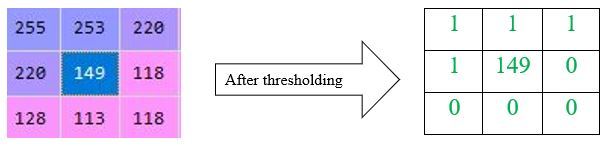
There are lots of different types of texture descriptors are used to extract features of an image. Local Binary Pattern, also known as LBP, is a simple and grayscale invariant texture descriptor measure for classification. In LBP, a binary code is generated at each pixel by thresholding it’s neighbourhood pixels to either 0 or 1 based on the value of the centre pixel. The rule for finding LBP of an image is as follows:
Let’s take an example to understand it properly. Let’s take a pixel value from the above output to find its binary pattern from its local neighbourhood. So, I am taking a value ‘149’ (present at 15th row and 19nd column) and its 8 neighbourhood pixels to form a 3 x 3 matrix. 👁 Image
Collect the thresholding values either clockwise or anti-clockwise. Here, I am collecting them clockwise from top-left. So, after collecting, the binary value will be as follows: 👁 Image
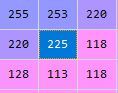
Then, convert the binary code into decimal and place it at center of matrix.
1 x 27 + 1 x 26 + 1 x 25 + 0 x 24 + 0 x 23 + 0 x 22 + 0 x 21 +1 x 20
= 128 + 64 + 32 + 0 + 0 + 0 + 0 + 1
= 225
Now, the resulted matrix will look like, 👁 Image
Now, let’s do it using python
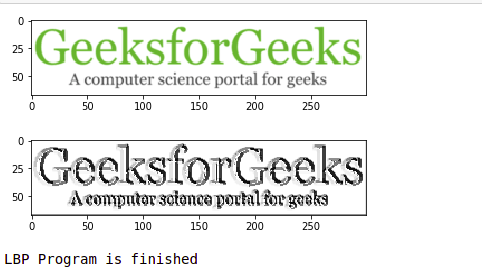
Output: 👁 python-lbp
The output shown in examples contains some values in its X-axis and Y-axis which refers to the width and height of the input image respectively.