PySpark helps in processing large datasets using its DataFrame structure. In this article, we will see different methods to create a PySpark DataFrame. It starts with initialization of SparkSession which serves as the entry point for all PySpark applications which is shown below:
from pyspark.sql import SparkSession spark = SparkSession.builder.getOrCreate()
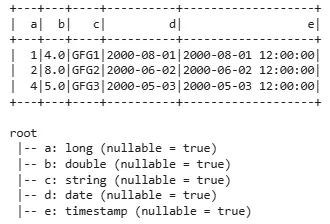
Lets see an example of creating DataFrame from a List of Rows. Here we can create a DataFrame from a list of rows where each row is represented as a Row object. This method is useful for small datasets that can fit into memory.
spark = SparkSession.builder.getOrCreate(): Initializes a SparkSession which is the entry point for working with PySpark or retrieves an existing session if one is already created.
df = spark.createDataFrame([...]): Creates a PySpark DataFrame using a list of Row objects where each row contains values for the columns a, b, c, d and e.
schema: A string or list specifying column names and data types. It is optional.
samplingRatio: Ratio of rows used for analysing schema. Default is None.
verifySchema: Ensures data types of each row match the schema. Default is True.
Returns: Dataframe
Different Methods to Create a PySpark DataFrame
1. Create PySpark DataFrame with an Explicit Schema
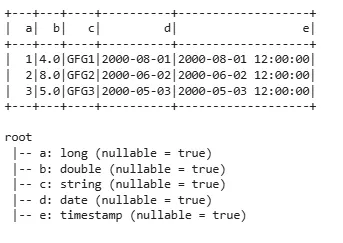
Here we can specify the schema explicitly to define the structure of DataFrame which is useful when we want more control over data types.
df = spark.createDataFrame([...], schema='a long, b double, c string, d date, e timestamp'): Creates a PySpark DataFrame using a list of tuples and an explicit schema that defines the column names and data types.
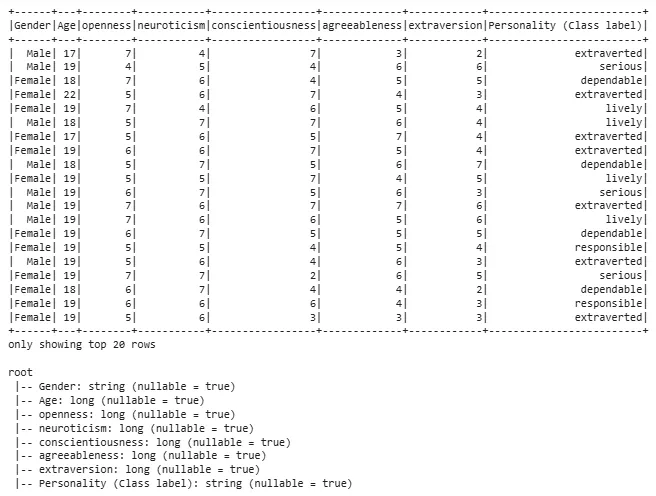
PySpark can easily load data from a CSV file into a DataFrame. Here we are using random dataset for its implementation. Download the dataset from train_dataset.
df = spark.createDataFrame(pd.read_csv('/content/train_dataset-1.csv')): Reads a CSV file using Pandas read_csv() function and then converts resulting Pandas DataFrame into PySpark DataFrame.
If our data is stored in a plain text file we can load each line as a row using the read.text() method. Here we are using a random .txt file which can be downloaded from here.
df = spark.createDataFrame(pd.read_csv('/content/text_file.txt', delimiter="\t")): Reads text file using pandas.read_csv() to load it into Pandas DataFrame.
JSON is a common format used for structured data. We can use read.json() to load data from JSON files directly into a PySpark DataFrame. The file we are using can be downloaded from here.
df = spark.createDataFrame(pd.read_json('/content/json_data.json')): Reads a JSON file using pandas.read_json() to load it into a Pandas DataFrame.
PySpark's process large-scale datasets using DataFrames and its integration with Spark's distributed computing framework makes it important for data science work.