|
VOOZH | about |
|
VOOZH | about |
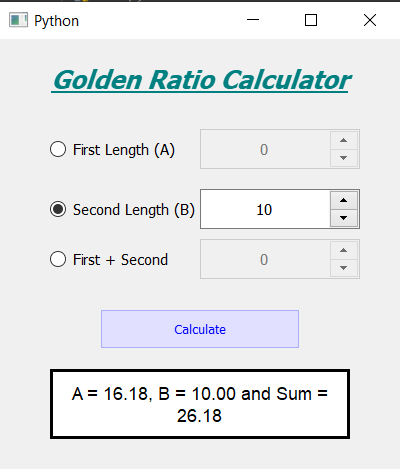
In this article we will see how we can create a golden ratio calculator using PyQt5. In mathematics, two quantities are in the golden ratio if their ratio is the same as the ratio of their sum to the larger of the two quantities. The value of golden ratio is 1.61803398875. Below is how the golden ratio calculator will look like 👁 Image
PyQt5 is cross-platform GUI toolkit, a set of python bindings for Qt v5. One can develop an interactive desktop application with so much ease because of the tools and simplicity provided by this library. Below is the command to install the PyQt5
pip install PyQt5
Concept : Below is the formula for calculating golden ratio
A / B = (A + B) / A = golden_ratio
Here A is the larger length and B is the shorter i.e second part of the length and the value of golden ratio is 1.61803398875.
GUI Implementation Steps : 1. Create a heading label that display the calculator name 2. Create three radio buttons for first, second and sum of the lengths 3. Create three spin boxes for user to enter the specific length 4. Create push button for calculating the other values according to golden ratio 5. Create a label to show the calculated values Back-End Implementation : 1. Initially make all the spin boxes disable 2. Add same action to all the three radio button 3. Inside the radio button method which radio button is checked 4. According to the checked radio button make the corresponding spin box enable and make the rest of the spin box disable 5. Also assign the flag values according to the selected radio button 6. Add same action to all three spin boxes 7. Inside the spin box action check which spin box is enabled and make other spin box values zero 8. Add action to the push button 9. Inside the push button action check the flag according to the flag with the help of golden ratio formula calculate the other two lengths 10. Format the calculated values and show the values with the help of result label
Below is the implementation
Output :