|
VOOZH | about |
|
VOOZH | about |
DataFrame.to_excel() is a Pandas method used to export a DataFrame into an Excel file. It lets you save data to a specific file, choose the sheet name, include/exclude indexes, and write selected columns if needed. This method is helpful when you want to store processed data, share results, or create structured reports.
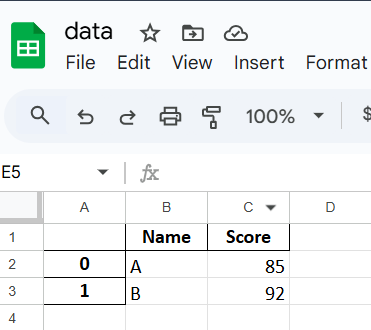
Example: This example shows how to export a DataFrame to an Excel file with the default settings, single sheet and index included.
Output
Explanation: df.to_excel("data.xlsx") saves the DataFrame to an Excel file named data.xlsx in the current directory.
DataFrame.to_excel(excel_writer, sheet_name="Sheet1", **kwargs)
Parameters:
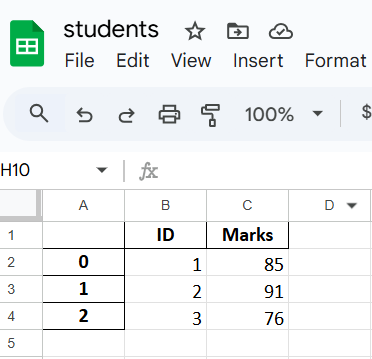
Example 1: This example writes a DataFrame to an Excel file and customizes the sheet name.
Output
Explanation: sheet_name="MarksData" changes the sheet name from default "Sheet1".
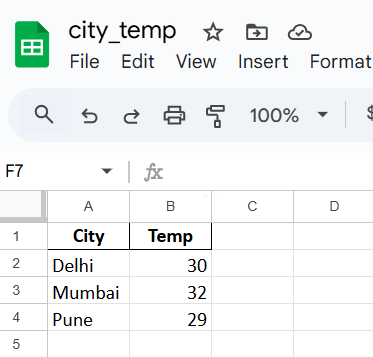
Example 2: This example exports the DataFrame but removes the default numeric index from the Excel file.
Output
Explanation: index=False prevents the index column from being written to the file.
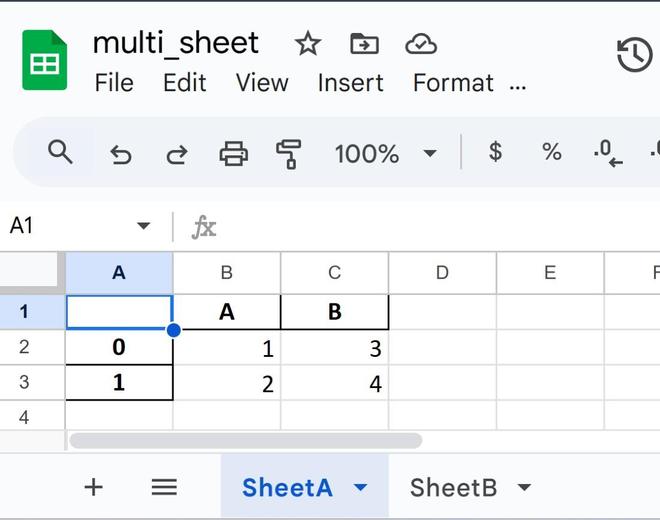
Example 3: This example shows how to save multiple DataFrames into different sheets of the same Excel file using ExcelWriter.
Output: Sheet A
Sheet B:
Explanation: