VOOZH about

URL: https://www.geeksforgeeks.org/python/deploying-a-django-app-to-heroku-using-github-repository/

⇱ Deploying a Django App to Heroku Using Github Repository - GeeksforGeeks


  • Courses
  • Tutorials
  • Interview Prep

Deploying a Django App to Heroku Using Github Repository

Last Updated : 23 Jul, 2025

Heroku is a free hosting cloud service provider. We can use our free dynos to deploy our applications on the cloud. The only disadvantage is that it loses all the data once the app sleeps and it cannot handle multiple requests at a time when hosted on free dynos.

First of all, to proceed further you need to have these two things ready

  1. Django app
  2. Heroku account

We need to do certain amendments to the Django app to get it ready to be hosted.

Preparing Django app :

  • Install gunicorn library using the below command
pip install gunicorn
  • Create a file without any extension and name it as Procfile

Fill the Procfile in the following way

web: gunicorn app_name.wsgi --log-file -
👁 Image
Procfile
  • Create a requirements.txt file and dump all the dependencies in it

You can use the below command to get all the dependencies into requirements.txt

pip freeze > requirements.txt
👁 Image
requirements.txt
  • Create a runtime.txt  and mention the python version you used to develop your Django app
python-full version
👁 Image
runtime.txt

Note: you need to create all these files outside the Django app i.e. at the same location of the manage.py  file

Now push your Django app to a Github repository and keep it ready.

We assume that you know how to push your code to the GitHub repository.

Deploying to Heroku:

In the first place, you need to have a Heroku account, create one in case you don't have one.

  • Log in to your Heroku account
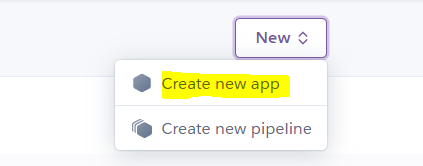
  • Click on new -> create new app.
👁 Image
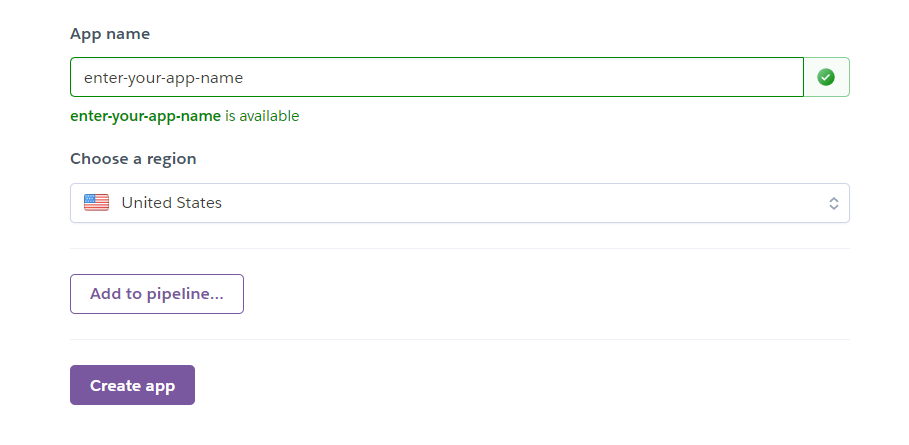
  • Select your app name and region and then click on create app
👁 Image
  • Select your app and go to the Deploy menu you can see the option to connect your Github to your Heroku app.
👁 Image
Deploy options
  • Click on connect to GitHub and authorize your GitHub account
  • After authorization, it will ask you to enter the repository you want to connect and the branch to deploy.
👁 Image
connect your repository
  • You can enable automatic deployments to maintain the latest changes with your commits or else you can deploy whenever you want with the latest changes.
👁 Image
deploy
  • Once you click on Deploy Branch your app gets deployed.
👁 Image
Initialization of deployment

Finally, your Django app got deployed.

👁 Image
Finally deployed!!!
  • Now your app will be available at https://yourappname.herokuapp.com/
  • If you have selected automatic deployments all your commits get deployed otherwise you need to deploy your changes.
  • The best part is that if any deployment does not work you can roll back to any version you want by simply clicking the rollback option in the "Activity" tab.
Comment