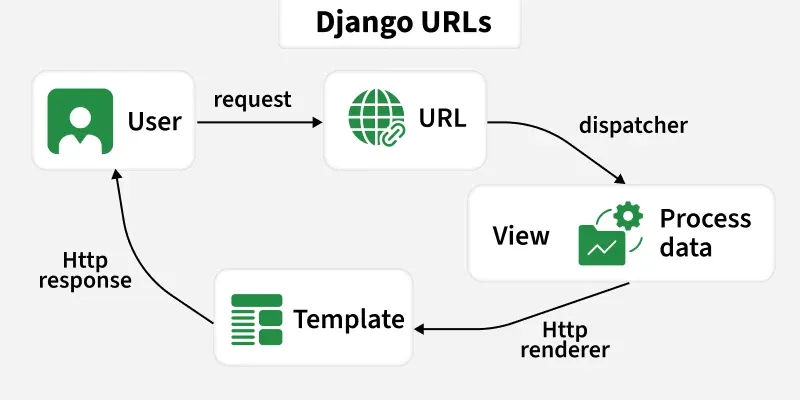
Views are Python functions or classes that handle HTTP requests and return HTTP responses. To make views accessible through specific URLs, Django uses a URL configuration system known as URLConf. This system maps URL patterns to corresponding views, enabling precise request routing.
👁 django_urls Django URLs Understanding URLConf URLConf directs incoming requests to the appropriate view based on defined URL patterns.
ROOT_URLCONF in settings.py specifies the root URL configuration module (usually project_name.urls). Each URLConf module defines a variable urlpatterns, which is a list of URL patterns. URL patterns are evaluated in order, the first match invokes its corresponding view. If no pattern matches, Django triggers the default error handler (e.g., 404). Structure of URLConf URLConf modules organize URL patterns for both project-level and app-level routing.
Use path() to map a URL pattern to a view. include() allows inclusion of app-specific URL configurations, keeping the project modular. Example : project-level urls.py
In the above example:
path('admin/', admin.site.urls) maps /admin/ to the Django admin interface. path('', include('books.urls')) delegates URL matching to the books app. Example : App-level urls.py:
URL Patterns URL patterns define the routes Django uses to match incoming HTTP requests to views.
URL patterns are stored in the urlpatterns list in a URLConf module. Each entry in urlpatterns typically uses the path() function to associate a URL pattern with a view. Dynamic parts of a URL can be captured using path converters and passed as arguments to views. Using the name argument in a path allows reverse URL resolution, useful in templates and views. Example: urls.py for a books app
In the above example:
path('books/<int:pk>/') retrieves a book by ID. path('books/<str:genre>/') filters books by genre. path('books/') matches the book listing page. Using name='...' allows references in templates using {% url 'name' %} and in Python code using reverse(). Example: Basic Django URL Routing with HTML Pages 1. Define views in views.py: 2. Create basic templates in templates/ folder: home.html:
about.html:
contact.html:
3. Define URL patterns in urls.py: Output
1. Home Page:
👁 HomePageDjangoApp Home Page 2. Click "Go to About":
👁 AboutPageDjangoApp About Page 3. Click "Go to Contact":
👁 ContactPageDjangoApp Contact Page Path Converters Path converters capture dynamic values from URLs and pass them as arguments to views. They are specified inside angle brackets < > in URL patterns.
int : matches positive integers and converts the captured value to a Python int. str : matches any non-empty string excluding the path separator /. slug : matches letters, numbers, hyphens, and underscores, suitable for readable URLs. path : matches any non-empty string, including the path separator /. uuid : matches a valid UUID string and converts it to a Python UUID object.