|
VOOZH | about |
|
VOOZH | about |
Pip, which stands for "Pip Installs Packages," is the package management system used to install and manage software packages written in Python. These packages are stored in the Python Package Index (PyPI). When you use pip to install a package, it also installs any dependencies required by that package. However, the behavior of pip when it comes to uninstalling packages and their dependencies is different and worth understanding.
The short answer is: No, pip does not automatically remove dependencies when you uninstall a package.
When you uninstall a package with pip, it only removes the specified package. The dependencies that were installed when you first installed the package remain in the environment. This is because other packages might depend on these shared dependencies, and automatically removing them could break other packages that are still needed.
Dependencies are simply nothing but other packages which are required for a particular package to function correctly.
Example: Let's us consider if we install a package like 'requests', then it's dependent on packages like 'charset', 'urllib', and 'certifi' etc.
To uninstall a package with 'pip', we can use the following command in the command prompt
pip uninstall <package_name>Example: Command to uninstall the 'request' package
pip uninstall requestsWe can even identify which packages are dependent on a package before uninstalling it. To achieve this we have tool named 'pipdeptree' tool which generated the dependency tree of installed packages.
1. Install pipdeptree package
#command prompt
pip install pipdeptree
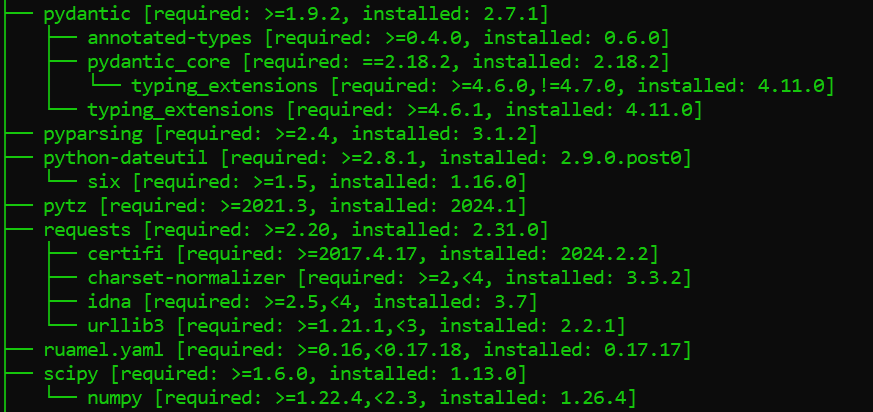
2. To get the dependency tree of all the packages in our currently working environment we can simple use the following command in our command prompt
pipdeptreeOutput:
To manage dependencies effectively, we need to consider using virtual environment. This helps our project dependencies from the packages which are installed on the system which results in preventing conflicts. Steps to manage dependencies
1. Creation of Virtual Environment (Command Prompt)
python -m venv myenv 2. Activate the virtual environment
myenv\Scripts\activate3. Install the required package within the virtual environment
pip install <package_name>Example:
To manage dependencies more effectively, you might need to check which packages are no longer needed and remove them manually. Here are some steps you can follow to manage dependencies:
You can list all the installed packages in your environment using:
pip listThis command shows all packages currently installed in your environment.
To check the dependencies of a particular package, you can use the pip show command:
pip show package-nameThis command provides detailed information about the package, including its dependencies.
If you identify that certain dependencies are no longer needed, you can manually uninstall them using:
pip uninstall dependency-package-nameThere are tools available that can help manage dependencies more effectively. One such tool is pip-autoremove. It can help to remove a package and its unused dependencies. To use it, first install the tool:
pip install pip-autoremoveThen, use it to remove a package along with its dependencies:
pip-autoremove package-nameTo prevent dependency issues we need to regularly check and remove orphaned packages. We can also take help of tools like pip-autoremove to get rid of orphaned packages.
1. Install pip-autoremove package
pip install pip-autoremove2. Specify the package name that we want to remove and its dependencies
pip-autoremove <package_name> -y
*pip_automremove is deprecated and not working in your system then we can manually uninstall orphaned packages using following command
pip uninstall <orphaned_package(s)> -y
It's crucial to manage package dependencies for maintaining a healthy python environment. By understanding how to uninstall, identify dependent and manage dependencies of packages we can prevent issues and ensure our python projects are running smoothly.