|
VOOZH | about |
|
VOOZH | about |
In this article, we are going to learn how to drop a column with the same name using column index using Pyspark in Python.
Pyspark offers you the essential function 'drop' through which you can easily delete one or more columns. But have you ever got the requirement in which you have various columns with the same column names and the requirement is to delete all the duplicate columns? This can be achieved in Pyspark by obtaining the column index of all the columns with the same name and then deleting those columns using the drop function.
In the example, we have created a data frame with four columns 'name', 'marks', 'marks', 'marks' as follows:
Once created, we got the index of all the columns with the same name, i.e., 2, 3, and added the suffix '_duplicate' to them using a for a loop. Finally, we removed the columns with suffixes '_duplicate' in them and displayed the data frame.
Output:
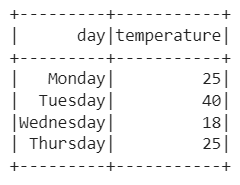
In the example, we have created a data frame with five columns with names 'day', 'temperature', 'temperature', 'temperature', and 'temperature' as follows:
Once created, we got the index of all the columns with the same name, i.e., 2, 3, 4, and added the prefix 'day_' to them using a for loop. Finally, we removed the columns with the prefixes 'day_' in them and displayed the data frame.