|
VOOZH | about |
|
VOOZH | about |
Cleaning data is an essential step in data analysis. In this guide we will explore different ways to drop empty, null and zero-value columns in a Pandas DataFrame using Python. By the end you'll know how to efficiently clean your dataset using the dropna() and replace() methods.
dropna()The dropna() function is a powerful method in Pandas that allows us to remove rows or columns containing missing values (NaN). Depending on the parameters used it can remove rows or columns where at least one value is missing or only those where all values are missing.
Syntax: DataFrameName.dropna(axis=0, how='any', inplace=False)
Parameters:
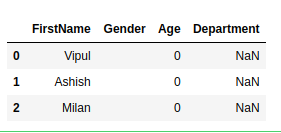
This is the sample data frame on which we will use to perform different operations.
Output:
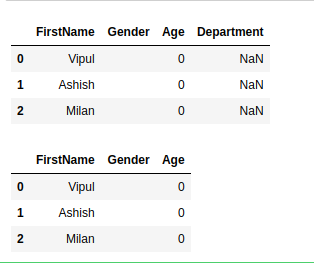
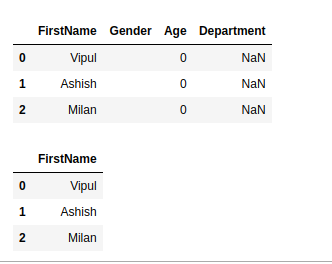
👁 ImageThis method removes columns where all values are NaN. If a column is completely empty (contains only NaN values) it is unnecessary for analysis and can be removed using dropna(how='all', axis=1).
Output:
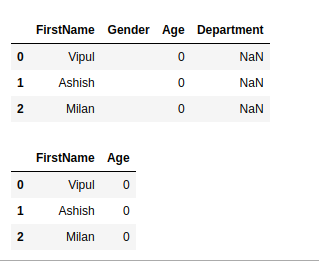
👁 ImageIf a column contains empty strings we need to replace them with NaN before dropping the column. Empty strings are not automatically recognized as missing values in Pandas so converting them to NaN ensures they can be handled correctly. After conversion we use dropna(how='all', axis=1) to remove columns that are entirely empty.
Output:
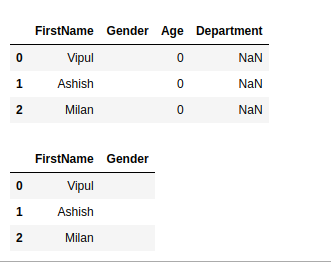
👁 ImageIf columns contain only zero values, we convert them to NaN before dropping them.
Output:
👁 ImageTo clean a dataset fully we may need to replace both zeros and empty strings.