|
VOOZH | about |
|
VOOZH | about |
In data processing and analysis, spreadsheets are a common format for storing and manipulating data. However, when working with large datasets or conducting complex analyses, it's often necessary to export data from multiple sheets into a more versatile format. CSV (Comma-Separated Values) files are a popular choice due to their simplicity. In this article, we'll explore two different methods for exporting multiple sheets as CSV using Python, along with code examples.
Below are examples of exporting multiple sheets as CSV using Python. Before exporting multiple sheets as CSV files, we need to install the Pandas and Openpyxl libraries, which help us convert sheets into CSV. To install these libraries, use the following command:
pip install pandas
pip install openpyxl
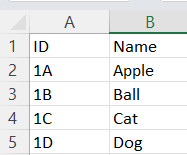
File Structure:
file.xlsx
In this example, below code reads an Excel file into a Pandas ExcelFile object, iterates through each sheet, converts each sheet into a DataFrame, and exports it to a CSV file with the same name as the original sheet.
Output
sheet1.csv
ID ,Name
1A,Apple
1B,Ball
1C,Cat
1D,Dog
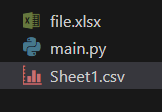
After file Structure
In this example, below Python code uses the 'openpyxl' and 'csv' modules to convert each sheet from an Excel workbook ('file.xlsx') into separate CSV files. It iterates through each sheet in the workbook, opens it, and writes its contents row by row into a newly created CSV file with the same name as the original sheet. This process allows for efficient extraction of data from multiple sheets in Excel into CSV format using Python.
Output
sheet1.csv
ID ,Name
1A,Apple
1B,Ball
1C,Cat
1D,Dog
After file Structure
In conclusion , Exporting multiple sheets as CSV using Python can greatly streamline data processing tasks, allowing for easy manipulation and analysis in various software environments. In this article, we explored two methods for achieving this: using the Pandas library and using openpyxl along with the csv module. Whether you prefer the simplicity of Pandas or the flexibility of openpyxl.