|
VOOZH | about |
|
VOOZH | about |
Cookies store user data in the browser as key-value pairs, allowing websites to remember logins, preferences, and other details. This helps improve the user experience by making the site more convenient and personalized.
Make sure that flask is already installed on our system - Flask Installation
set_cookie( ) method: Using this method we can generate cookies in any application code. The syntax for this cookies setting method:
Response.set_cookie(key, value = '', max_age = None, expires = None, path = '/', domain = None, secure = None, httponly = False)
Example:
Running the code in Visual Studio Code application.
Output: Go to the above-mentioned url in the terminal -For Example - http://127.0.0.1:5000/route-name. Here the route-name is setcookie.
This get( ) method retrieves the cookie value stored from the user's web browser through the request object.
Output:
Let's create a simple login page in Flask using cookies.
Output:
From the image above, we can see the website's cookies. The 'username' is the key, and its value 'Greeshma' shows that cookies store data as key-value pairs.
To view cookies in your browser:
We will track the number of visitors to our website using cookies. Since we haven't previously stored a "visitors count" variable, the cookie will default to 0 (as per Python's dictionary behavior).
Output: Url - http://127.0.0.1:5000
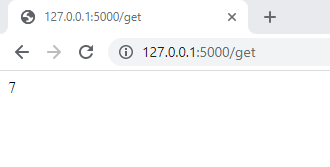
Url for below output- http://127.0.0.1:5000/get
In the above output screenshot, the value of the website visitors count is retrieved using request.cookies.get( ) method.
Cookies Tracking in Browser
The flask cookies can be secured by putting the secure parameter in response.set_cookie('key', 'value', secure = True) and it is the best-recommended practice to secure cookies on the internet.