|
VOOZH | about |
|
VOOZH | about |
A REST API (Representational State Transfer API) is a way for applications to communicate over the web using standard HTTP methods. It allows clients (such as web or mobile apps) to interact with a server by sending requests and receiving responses, typically in JSON format.
REST APIs follow a stateless architecture, meaning each request from a client to the server is independent and does not rely on previous requests. This makes REST APIs scalable, flexible, and easy to integrate with different platforms.
1. Uses standard HTTP methods for CRUD operations:
2. Follows a stateless design (each request is processed independently).
3. Uses JSON or XML for structured data exchange.
4. Enables easy integration with web, mobile, and third-party services.
Create a project folder and then inside that folder create and activate a virtual environment to install flask and other necessary modules in it. Use these commands to create and activate a new virtual environment:
python -m venv venv
.venv\Scripts\activate
And after that install flask using this command:
pip install Flask
A REST API typically performs CRUD (Create, Read, Update, Delete) operations. In Flask, we define API routes using @app.route().
To demonstrate how to define REST APIs in Flask, we will create a simple Flask application that manages a collection of books. Our API will allow users to view, add, update, and delete books. Here is the code for the app:
Explanation of API Routes
We can test out API using Postman application so make sure you it installed on your system, if not, then download and install it from here. Run the application using this command in terminal and then open postman app:
python app.py
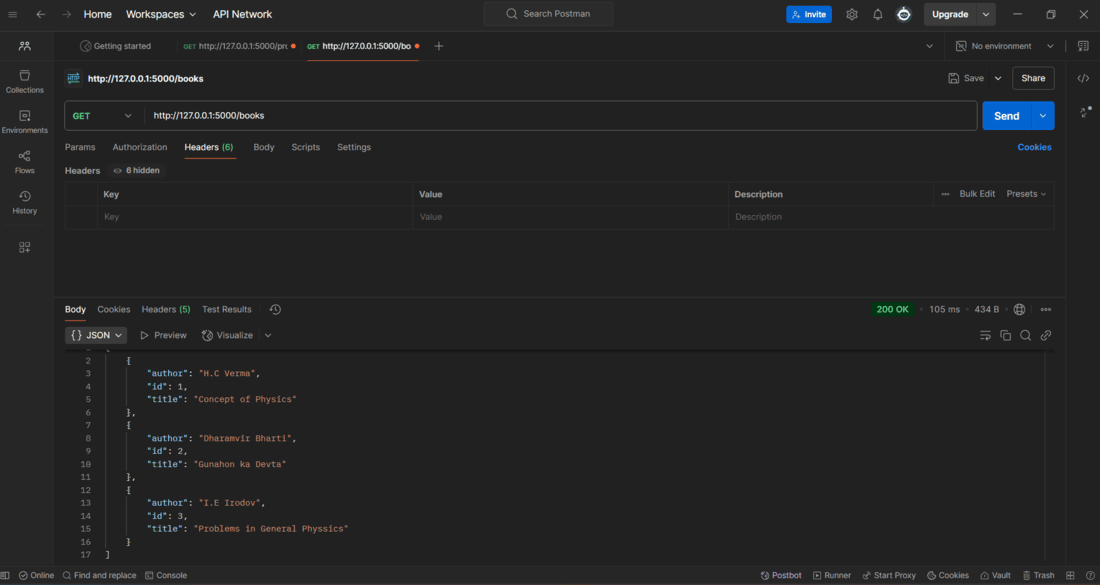
1. In the postman app, make a GET Request to the URL: "http://127.0.0.1:5000/books" to view all the books.
2. Now to get a single book make a GET Request to this URL: "http://127.0.0.1:5000/books/1":
To Post a new book data into the list we can make a POST Request to this URL: "http://127.0.0.1:5000/books" and provide the data of the new book data in JSON format under the body tag in postman app:
From the above snapshot, we can see that the Response Status is 201 CREATED, which means that the post request was successful. Similarly we can perform every CRUD operation using the postman app.