Flask-WTF is a Flask extension that integrates the WTForms library, making form creation and validation easier in Flask applications. It provides a structured way to build forms, handle validation, and render them in HTML. In this article, we'll explore how Flask-WTF works by building a Signup form. Before diving in, let's go over its features, field types, and prerequisites.
Secure Form Handling: Automatically manages CSRF protection to prevent unauthorized submissions.
Easy Form Rendering: Supports various field types like text fields, checkboxes, and dropdowns for smooth HTML integration.
Built-in Validation: Includes required fields, length constraints, pattern matching, and support for custom validation.
File Uploads: Allows users to upload files through forms seamlessly.
Prerequisites: Knowledge of Python, HTML, CSS, Javascript
Installation
To use Flask-WTF, we first need to install it using pip and import it into our application.
pip install flask-wtf
In Flask-WTF, forms are defined as classes that extend the FlaskForm class. Fields are declared as class variables, making form creation simple and structured.
Common WTForms Field Types:
StringField: Text input field for string data.
PasswordField: Input field for password values.
BooleanField: Checkbox for True/False selection.
DecimalField: Input field for decimal values.
RadioField: Group of radio buttons for single selection.
SelectField: Dropdown list for single selection.
TextAreaField: Multi-line text input field.
FileField: File upload field.
Custom Validators in Flask-WTF
Flask-WTF provides built-in validators for common validation tasks, but custom validators can be created when application-specific validation rules are required. Custom validators help enforce additional constraints beyond the standard validation options.
Example: The following validator ensures that a username contains only alphabetic characters:
Explanation:
Create a Validation Function: The custom validator receives the form and field objects as arguments.
Apply Validation Logic: The function checks whether the submitted value satisfies the required condition.
Raise ValidationError: If validation fails, a ValidationError is raised with an appropriate error message.
Attach Validator to a Field: The custom validator is added to the field's validators list and is executed during form validation.
Flask - WTF Examples
Example 1
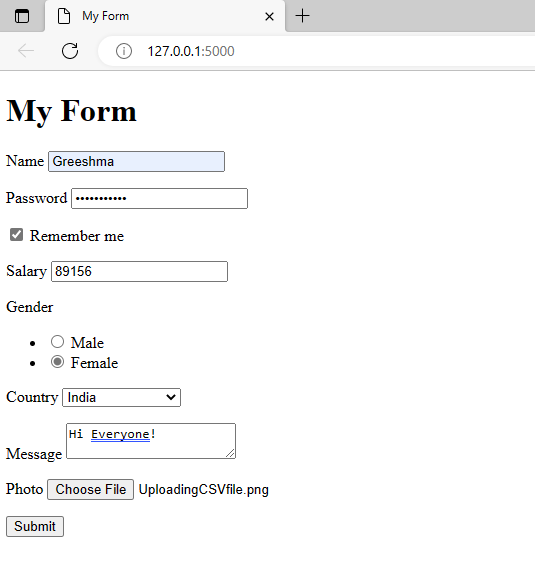
Building a sample form using the above field types
index.html
Explanation:
Created a Form Class: MyForm inherits from FlaskForm and includes various fields like StringField, PasswordField, BooleanField, etc., with appropriate validators.
Passed Form to Template: In the index function, an instance of MyForm is created and sent to index.html.
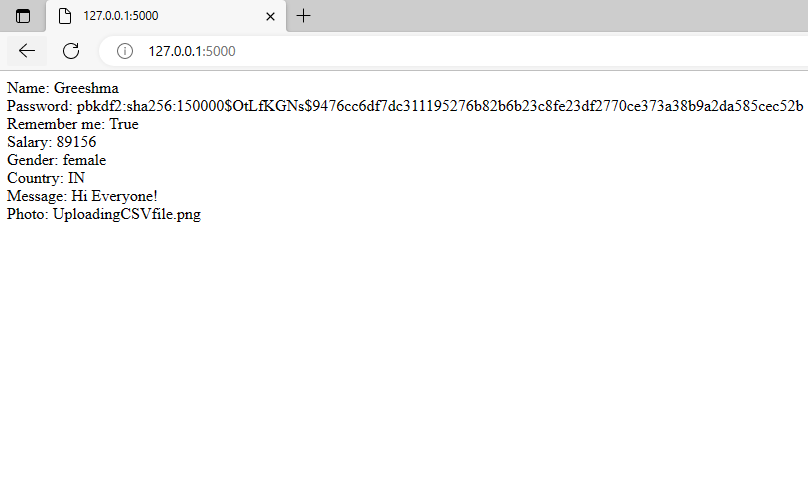
Handled Form Submission: The validate_on_submit method checks if the form is valid before processing data.
Retrieved and Displayed Data: If valid, form data is extracted and shown in the browser.
Secured Passwords: Used generate_password_hash to encrypt passwords for better security.
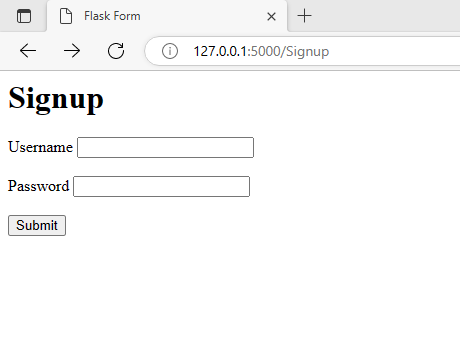
Let's see another example of a simple Sign-up form using the Flask-WTF library where we use the field types mentioned above in our application.
Signup.html code
Explanation:
{{ form.hidden_tag() }} renders all hidden fields automatically, including the CSRF token.
{{ form.username.label }} renders an HTML label for the username field of the form.
{{ form.username }} renders an HTML input element for the username field of the form.
{{ form.password.label }} renders an HTML label for the password field of the form.
{{ form.password }} renders an HTML input element for the password field of the form.
{{ form. submit }} renders an HTML input element for the form's submit button.
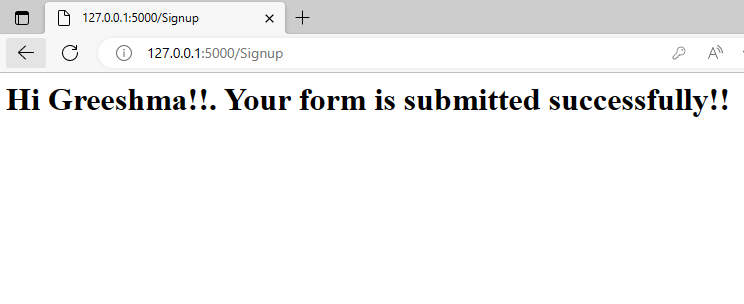
The form is validated using validate_on_submit(). After successful validation, the submitted data is processed and a confirmation message is displayed with the username.