|
VOOZH | about |
|
VOOZH | about |
Geospatial data plays a crucial role in location-based applications such as mapping, navigation, logistics, and geographic data analysis. MongoDB provides robust support for geospatial queries using GeoJSON format and 2dsphere indexes, making it an excellent choice for handling location-based data efficiently.
In this article, we will cover the various ways of using geospatial in MongoDB and explain the GeoJSON polygon and point types
👁 ImageGeoJSON is an open-source format based on JSON (JavaScript Object Notation) that represents geographic features such as points, lines, and polygons. MongoDB supports GeoJSON objects to store and manipulate geospatial data efficiently. GeoJSON is an open-source format that describes simple geographical features. It includes two essential fields:
Note: If specifying latitude and longitude coordinates, list the longitude first and then latitude.
{
 "type": "Point",
 "coordinates": [-73.856077, 40.848447]
}
Explanation: Here, -73.856077 is the longitude, and 40.848447 is the latitude.
{ "type": "Point", "coordinates": [longitude, latitude] }{ "type": "LineString", "coordinates": [[lng1, lat1], [lng2, lat2]] }{ "type": "Polygon", "coordinates": [[[lng1, lat1], [lng2, lat2], [lng3, lat3], [lng1, lat1]]] }MongoDB provides two indexing types to work with geospatial data:
2d Index (Legacy Coordinate Pairs) – Used for flat coordinate spaces.2dsphere Index – Used for real-world spherical calculations (Recommended).import pymongo
# Connect to MongoDB
client = pymongo.MongoClient("your_connection_string")
# Select database
db = client["geospatial_db"]
# Select collection
locations = db["places"]
# Insert a GeoJSON document (Example: A cafe location)
location_data = {
"name": "Central Cafe",
"location": {
"type": "Point",
"coordinates": [-74.006, 40.7128] # Longitude, Latitude
}
}
# Insert document
locations.insert_one(location_data)
2dsphere Index for Efficient QueriesIndexes improve query performance by enabling geospatial computations. Before running geospatial queries, create an index on the location field:
locations.create_index([("location", pymongo.GEOSPHERE)])MongoDB supports several types of geospatial queries:
$near)Find locations within a certain radius (e.g., within 5 km of a given point). Use $maxDistance (in meters) to filter nearby results.
query = {
 "location": {
 "$near": {
 "$geometry": {
 "type": "Point",
 "coordinates": [-74.006, 40.7128] # Search around this location
 },
 "$maxDistance": 5000 # Distance in meters (5 km)
 }
 }
}

nearby_places = locations.find(query)

for place in nearby_places:
 print(place)
$geoWithin)Find locations inside a defined polygon (e.g., a city boundary):
polygon_query = {
 "location": {
 "$geoWithin": {
 "$geometry": {
 "type": "Polygon",
 "coordinates": [[
 [-74.0, 40.7], [-74.02, 40.72], [-74.04, 40.7], [-74.0, 40.7]
 ]]
 }
 }
 }
}

inside_places = locations.find(polygon_query)

for place in inside_places:
 print(place)
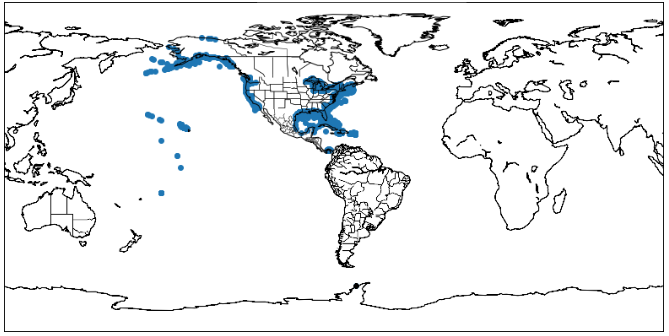
To analyze and visualize geospatial data stored in MongoDB, we use Matplotlib for plotting and Basemap for mapping geographic locations.
To work with geospatial data in Python, install the following modules:
This module is used to interact with the MongoDB. To install it type the below command in the terminal.
pip install pymongo
OR
conda install pymongo
This library is used for plotting graphs
pip install matplotlibThis module is used for plotting maps using Python. To install this module type the below command in the terminal.
conda install basemapTo use MongoDB Atlas for storing geospatial data, follow these steps:
(...) and select Load Sample Dataset. course_cluster_uri).Below is a Python script to connect to MongoDB Atlas, retrieve geospatial data, and plot it on a map.
import pymongo
import pprint
import matplotlib.pyplot as plt
from mpl_toolkits.basemap import Basemap


course_cluster_uri = 'your_connection_string'

course_client = pymongo.MongoClient(course_cluster_uri)

# sample Database
db = course_client['sample_geospatial']

# sample Collection
shipwrecks = db['shipwrecks']
l = list(shipwrecks.find({}))

lngs = [x['londec'] for x in l]
lats = [x['latdec'] for x in l]
# Clear the figure (this is nice if you
# execute the cell multiple times)
plt.clf()

# Set the size of our figure
plt.figure(figsize =(14, 8))

# Set the center of our map with our
# first pair of coordinates and set
# the projection
m = Basemap(lat_0 = lats[0],
 lon_0 = lngs[0],
 projection ='cyl')

# Draw the coastlines and the states
m.drawcoastlines()
m.drawstates()

# Convert our coordinates to the system
# that the projection uses
x, y = m(lngs, lats)

# Plot our converted coordinates
plt.scatter(x, y)

# Display our beautiful map
plt.show()
Output:
Explanation:
MongoDB’s geospatial queries provide a powerful way to store, index, and analyze location-based data using GeoJSON and 2dsphere indexes. By using queries like $near and $geoWithin, developers can efficiently search for nearby locations or points within a defined area. Combining MongoDB with Python’s pymongo library, along with visualization tools like Matplotlib and Basemap, makes it easier to work with geospatial data in real-world applications. Whether it's for navigation, logistics, ride-sharing, or mapping services, MongoDB offers a scalable and efficient solution for handling geospatial information