|
VOOZH | about |
|
VOOZH | about |
In this article, we will Group and filter the data in PySpark using Python.
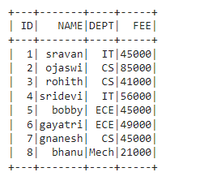
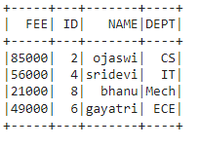
Output:
👁 ImageIn PySpark, groupBy() is used to collect the identical data into groups on the PySpark DataFrame and perform aggregate functions on the grouped data. We have to use any one of the functions with groupby while using the method
Syntax: dataframe.groupBy('column_name_group').aggregate_operation('column_name')
Filter the data means removing some data based on the condition. In PySpark we can do filtering by using filter() and where() function
This is used to filter the dataframe based on the condition and returns the resultant dataframe
Syntax: filter(col('column_name') condition )
filter with groupby():
dataframe.groupBy('column_name_group').agg(aggregate_function('column_name').alias("new_column_name")).filter(col('new_column_name') condition )
where,
- dataframe is the input dataframe
- column_name_group is the column to be grouped
- column_name is the column that gets aggregated with aggregate operations
- aggregate_function is among the functions - sum(),min(),max() ,count(),avg()
- new_column_name is the column to be given from old column
- col is the function to specify the column on filter
- condition is to get the data from the dataframe using relational operators
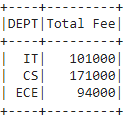
Output:
👁 ImageOutput:
👁 ImageThis is used to select the dataframe based on the condition and returns the resultant dataframe
Syntax: where(col('column_name') condition )
where with groupby():
dataframe.groupBy('column_name_group').agg(aggregate_function('column_name').alias("new_column_name")).where(col('new_column_name') condition )
where,
- dataframe is the input dataframe
- column_name_group is the column to be grouped
- column_name is the column that gets aggregated with aggregate operations
- aggregate_function is among the functions - sum(),min(),max() ,count(),avg()
- new_column_name is the column to be given from old column
- col is the function to specify the column on where
- condition is to get the data from the dataframe using relational operators
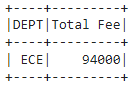
Output:
👁 ImageOutput:
👁 ImageThe window function is used for partitioning the columns in the dataframe
Syntax: Window.partitionBy('column_name_group')
where, column_name_group is the column that contains multiple values for partition
We can partition the data column that contains group values and then use the aggregate functions like min(), max, etc to get the data. In this way, we are going to filter the data from the PySpark DataFrame with where clause.
Syntax: dataframe.withColumn('new column', functions.max('column_name').over(Window.partitionBy('column_name_group'))).where(functions.col('column_name') == functions.col('new_column_name'))
where,
- dataframe is the input dataframe
- column_name_group is the column to be partitioned
- column_name is to get the values with grouped column
- new_column_name is the new filtered column
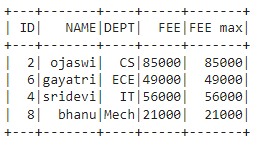
Output:
👁 ImageWe can filter the data with aggregate operations using leftsemi join, This join will return the left matching data from dataframe1 with the aggregate operation
Syntax: dataframe.join(dataframe.groupBy('column_name_group').agg(f.max('column_name').alias('new_column_name')),on='FEE',how='leftsemi')