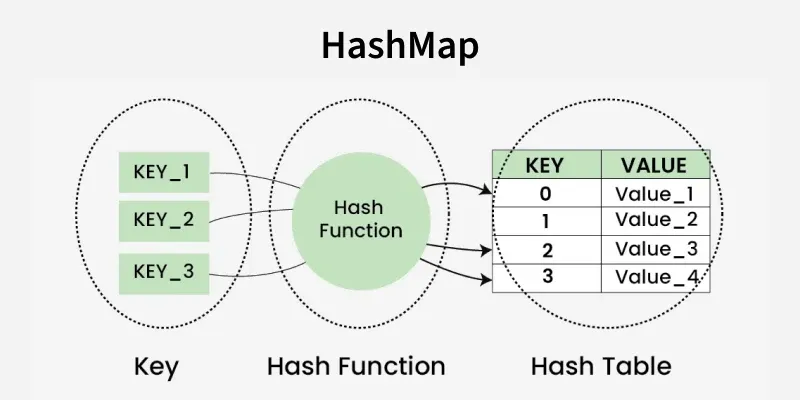
A hash map is a data structure that stores key-value pairs and allows fast access, insertion and deletion of values using keys. Python comes with built-in hash maps called dictionaries (dict). Keys are required to be unique and immutable (such as strings, numbers, or tuples), while values can be any Python object.
Caching: Quickly map memory locations to stored values
Database indexing: Efficiently index tuples for fast retrieval
Pattern matching algorithms: Example: Rabin-Karp
Counting and storing frequencies: Efficient data aggregation
How Hash Maps Work
Hash Function:
Converts a key into an index in the underlying array (bucket array).
Ideally, each key maps to a unique index, but collisions can happen because multiple keys may hash to the same index.
Collision Handling:
Chaining: Store multiple key-value pairs in the same bucket, usually as a list or linked list.
Open Addressing / Rehashing: If a collision occurs, find another empty bucket according to some probing method (linear probing, quadratic probing, etc.).
Key Operations
Insert or Update (set_val(key, value)): Add a key-value pair. If the key exists, update its value.
Retrieve (get_val(key)): Get the value associated with a key. Returns "No record found" if the key does not exist.
Delete (delete_val(key)): Remove a key-value pair from the hash map.
Display (__str__()): Show all key-value pairs stored in the hash map.
Python Implementation
Python dictionaries (dict) are implemented as hash maps.
You can create a custom hash map (like your HashTable class) to understand how hash maps work internally.
Below is the implmentation for Hash Map from scratch:
1. Class Creation
HashTable defines a simple hash map structure.
__init__() is the constructor that initializes the class.
"size" specifies the number of buckets (slots) in the hash table.
self.size stores this value within the object.
self.hash_table creates a list of empty lists — each serving as a bucket to hold key–value pairs.
Multiple pairs can exist in one bucket, enabling collision handling using chaining.
2. Insert or Update (set_val)
hash(key) % self.size calculates the bucket index where the key–value pair should be stored.
bucket retrieves the list at that index.
The loop checks whether the key already exists in the bucket:
If found: update the existing value. If not found: append the new key–value pair.
Collisions are handled using chaining, where multiple key–value pairs can coexist in the same bucket.
3. Retrieve (get_val)
Finds the bucket where the key would be.
Searches for the key in the bucket: If found: returns the value. If not found: returns "No record found".
4. Delete (delete_val)
hash(key) % self.size identifies the bucket where the key should exist.
Searches for the key in the bucket: If found: removes the key-value pair. If not found: does nothing.
5. Display (__str__)
Iterates through all buckets and converts each to a string.
Displays the contents of all buckets, making it easier to visualize data distribution and collisions.
6. Creating and Printing the Hash Table
ht = HashTable(3): Creates a new hash table object with 3 empty buckets.
print(ht): Calls the __str__ method, which shows the contents of all buckets.
Since no key-value pairs have been added yet, the output is:
[][][]
Complete Code
Output
[][][]
Example: Let's create a hashmap and perform different operations to check if our class is working correctly.
Output
Hash Table: [('cherry', 30)][('apple', 10)][('banana', 20)] Value for 'banana': 20 Value for 'apple': 10 Updated Hash Table: [('cherry', 30)][('apple', 50)][('banana', 20)] After Deletion: [('cherry', 30)][('apple', 50)][] Value for 'banana': No record found
Explanation:
ht = HashTable(3): Creates a hash table with 3 buckets.
set_val(): Adds 'apple', 'banana', and 'cherry' with values 10, 20, and 30.
print(ht): Displays all stored key-value pairs.
get_val('banana') & get_val('apple'): Retrieve values 20 and 10.
set_val('apple', 50): Updates 'apple' value to 50.
delete_val('banana'): Removes 'banana' from the table.
get_val('banana'): Returns “No record found” since it was deleted.
Advantages and Disadvantages of Hash Maps
Advantages
Disadvantages
Fast key-based access (average O(1) time complexity)
Collisions can slow down operations
Supports negative and non-integer keys
Large key sets may cause frequent collisions
Maintains insertion order and allows efficient iteration
Inefficient performance with poorly designed hash functions