|
VOOZH | about |
|
VOOZH | about |
In this article, we will be looking at the way to design a game in which the user has to guess which has a higher number of followers and it displays the scores.
The name of some Instagram accounts will be displayed, you have to guess which has a higher number of followers by typing in the name of that account. Make sure you type the name exactly as shown. If the answer is correct, one of the accounts will stay, and some other account will be displayed to compare to. We will develop the game using basic concepts of Python.
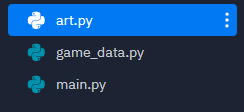
Project Structure
Additional Resources - We will use some ASCII art to show the title of our game and make it look more attractive. It will be stored in a separate python file - art.py. You can generate your own ASCII art from here: https://patorjk.com/software/taag/#p=display&f=Graffiti&t=Type%20Something%20
File: art.py
The next part is to have some data for our game to work. Note that the data is bound to be incorrect as compared to when you are reading this article as the number of followers keeps changing. So to have highly accurate data, you update it yourself. Game data is simply a Python list of dictionaries. You can find sample data in this file game_data Copy it and paste it into a separate python file - game_data.py. This is what a small sample of complete data will look like.
File: game_data.py
Data stored in a Python file can be used in some other Python file using from and import keyword where from specifies from which file we want to import and import specifies which data we want to use. We also make an optional import, which is a clear() method, that will clear out the output console, so that the game can be carried out for a longer period without cluttering the output screen with unnecessary output text.
Data stored in a Python file can be used in some other Python file using from and import keyword where from specifies from which file we want to import and import specifies which data we want to use. We also make an optional import, which is a clear() method, that will clear out the output console, so that the game can be carried out for a longer period without cluttering the output screen with unnecessary output text.
Here, the choice method of random modules randomly picks an item from a list. The item, which in this case is a dictionary, is stored in a variable wherever this function is called.
We store the follower counts of each account in a variable and compare them to see which account has a greater number of follower counts and store the name of that account in a variable, max. Then we compare it with the user input name, if the user inputs the correct name, then True is returned otherwise False is returned.
We need a loop to continuously keep asking for user input, and keep checking them. If he is correct, the loop will continue, otherwise loop break. We don't want the function to end there, we want to ask him if would like to play again, we do this by using an outer while loop, which will keep running as long as the user wants to keep playing. In the loop for current gameplay, make two variables and use the assign method to assign them an account, display them, then ask for the user input, compare it and continue the loop if the user is correct. In the second iteration, we want the change the accounts displayed on the screen. We want to keep the second account, make it as account one, and use assign method to assign some other account to account2. To make this happen in the second iteration, and not in the first, we need to track the score, which initially is zero and increases if the user is correct. If the score is not zero then it means the user is not in the first iteration, and his previous answer was correct. Thus we change the accounts to display in this if check.
After the compare function is called, the score increase by 1 and the loop continues otherwise score is set to zero, and the game loop end. Due to the outer loop, the user is asked for input, if he wants to continue or not if he wants to, the loop continues, due to which a new game starts which will keep executing as long the user keeps entering correct input.
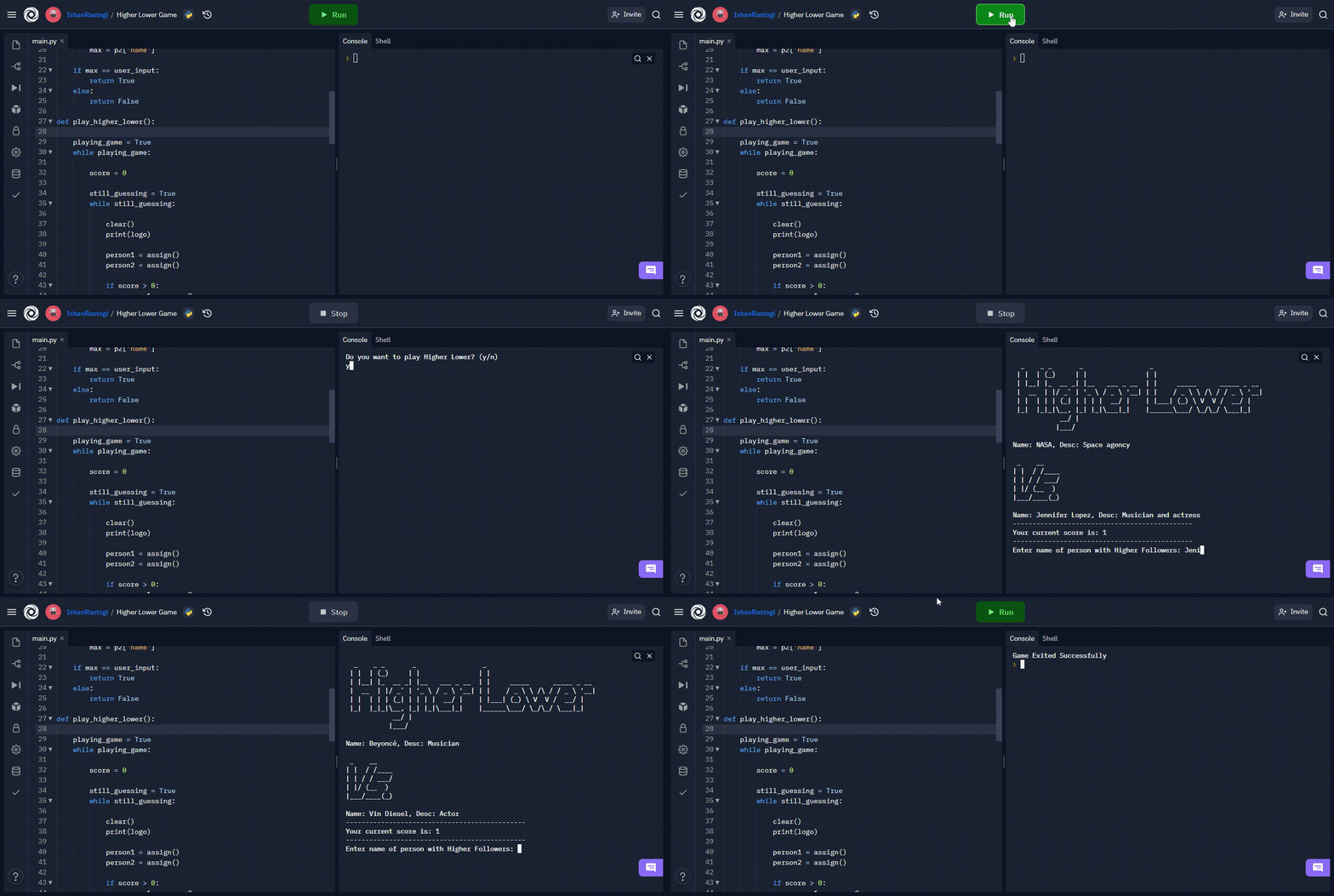
Output: